
Teams
A Team allows multiple doulas within a business to collaborate in one shared workspace. You can easily switch between your personal workspace and your teams from the User Menu.
Teams are designed to make a few situations easier in Doulado:
- Support an agency, non-profit or other business with multiple individuals
- Collaboration between doulas that work together and share billing and business processes
Table of Contents
- Starting a New Premium Account
- Creating a Team
- Managing Team Members
- Editing Team Settings
- Switching Between Teams
- Deleting or Pausing a Team
- Assigning Clients to a Team Member
- Creating Team-Wide Events
- Viewing and Messaging Team Members
- Network Journeys
- Seat Management and Billing
Where to Find It
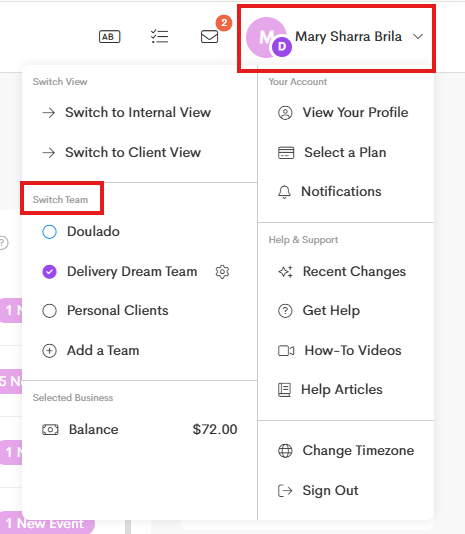
You can easily switch between your personal workspace and your teams from the User Menu.
-
Click on your Profile Name and refer to the Switch Team section.
-
Select a team to check and click on the Manage Team button.
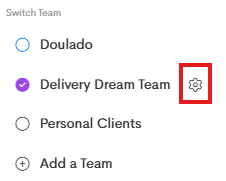
From there, the Manage Team window will open to show you information on roles, display your team members, and manage settings for the team.

Do I need a team to share clients?
No, you don't need a team just to share clients.
Client profiles can be shared individually with as many doulas as you like, and they can be given permission levels that differ based on your needs.
Differences in Teams and Sharing Individually
There are a few things that make teams different than just collaborating with other doulas by sharing clients individually:
- Team owners: Team is owned and managed by the members that are given Owner permissions. Those members can invite other team members, manage the team settings, create and edit all templates, edit business details, and have permission to see and manage everything for clients owned by the team.
- Centralized billing: Invoices for a team will pay the team's business account and use the teams products and services. If payment processing is enabled, the payments will be paid out to the bank account listed on the team, regardless of who on the team creates and sends the invoice.
- Shared documents: Each team has a shared copy of the document templates that can be sent to clients, which are managed by the team owners.
- Visibility: By default, all team members have visibility to see documents and files shared to clients by other team members.