
Labels
Labels provide a flexible tagging system to categorize client journeys, filter content, and manage structured data. They apply to Clients, as well as other areas of the platform:
- Lead Forms
- Checklists / Workflows
- Booking Pages
- Client List Filter
Labels are completely customizable for your business, and being visible in the main client list allows them to be a helpful tool to organize clients and track various parts of their journey or status.
To keep everything structured, you can group labels and form fields, making it even easier to manage your services efficiently.
Articles
- Setting Up Labels, Form Fields, and Groups
- Managing Labels & Fields
- Using Labels & Filtering
- Label Inheritance & Transfers
Where to Find It
Labels can be found by navigating to Templates → Labels. The management area is divided into two tabs:
- Client: Labels and fields for standard client journeys.
-
Network: Specialized labels and fields for referral partners and network contacts.
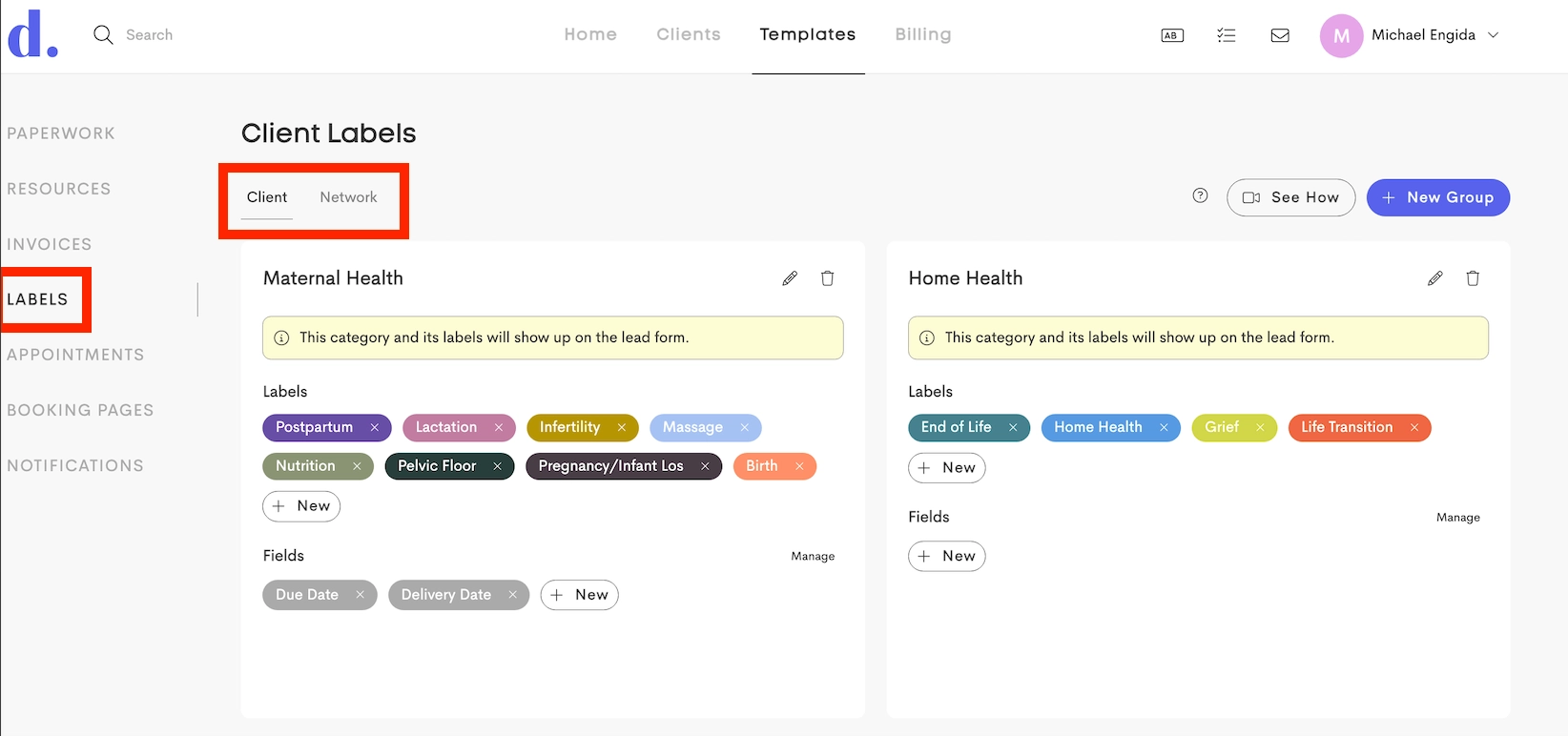
The labels and fields will only be available to matching client type (Client/ Network).
Permissions: Only Business/Team Owners can create/manage labels. All team members can use/assign existing labels to clients.
Label Organization
Labels are organized under groups and can contain fields:
Groups
Top-level containers (e.g. "Maternal Health")

Labels
Visual, colored tags attached to journey

Fields
Custom data fields (e.g., "Language", "Blood Type") defined within a group to collect specific information
