
August 2026
This update brings a mix of new features and improvements designed to make everyday work in Doulado easier and more efficient. From the new Workflows & Automations to smoother booking, client management, paperwork, team management, and billing updates, these changes are focused on reducing manual work, improving visibility, and giving you more control over how you manage your clients and team.
#1 Workflows & Automations
-
Workflows & Automations are now available on Premium, Team and Impact plans! Workflows help you streamline client care by organizing clients into customizable phases and automating tasks like emails, texts, resources, paperwork, invoices, and more. Automations can be triggered manually, after a delay, or based on gestational age or baby's age, helping reduce repetitive work and create a more consistent client experience.
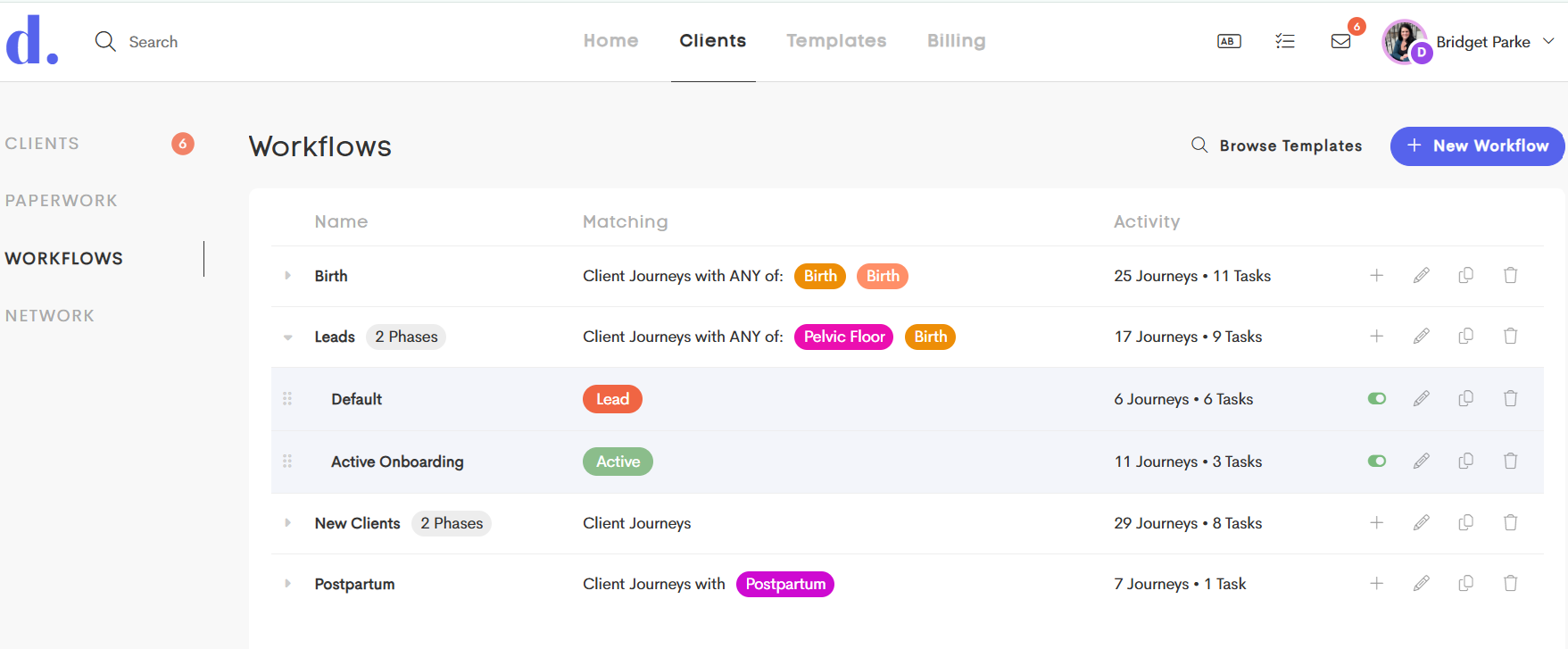
If you're on one of these plans, your existing Checklists have automatically been converted to Workflows. Don't worry, your existing checklists will continue to work as they did before. You can now take them a step further by adding automated actions and triggers to individual tasks.
Learn all about workflows in these related articles:
#2: Lead Forms & Client Management
-
Lead Forms now warn about unsaved changes: When customizing a Lead Form, Doulado will now warn you before closing the editor if you have unsaved changes.
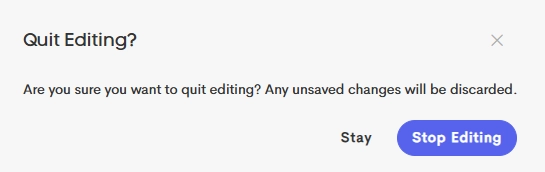
This confirmation prompt gives you an opportunity to save your work before closing the editor and ensures you don't accidentally lose changes while you customize your Lead Forms.
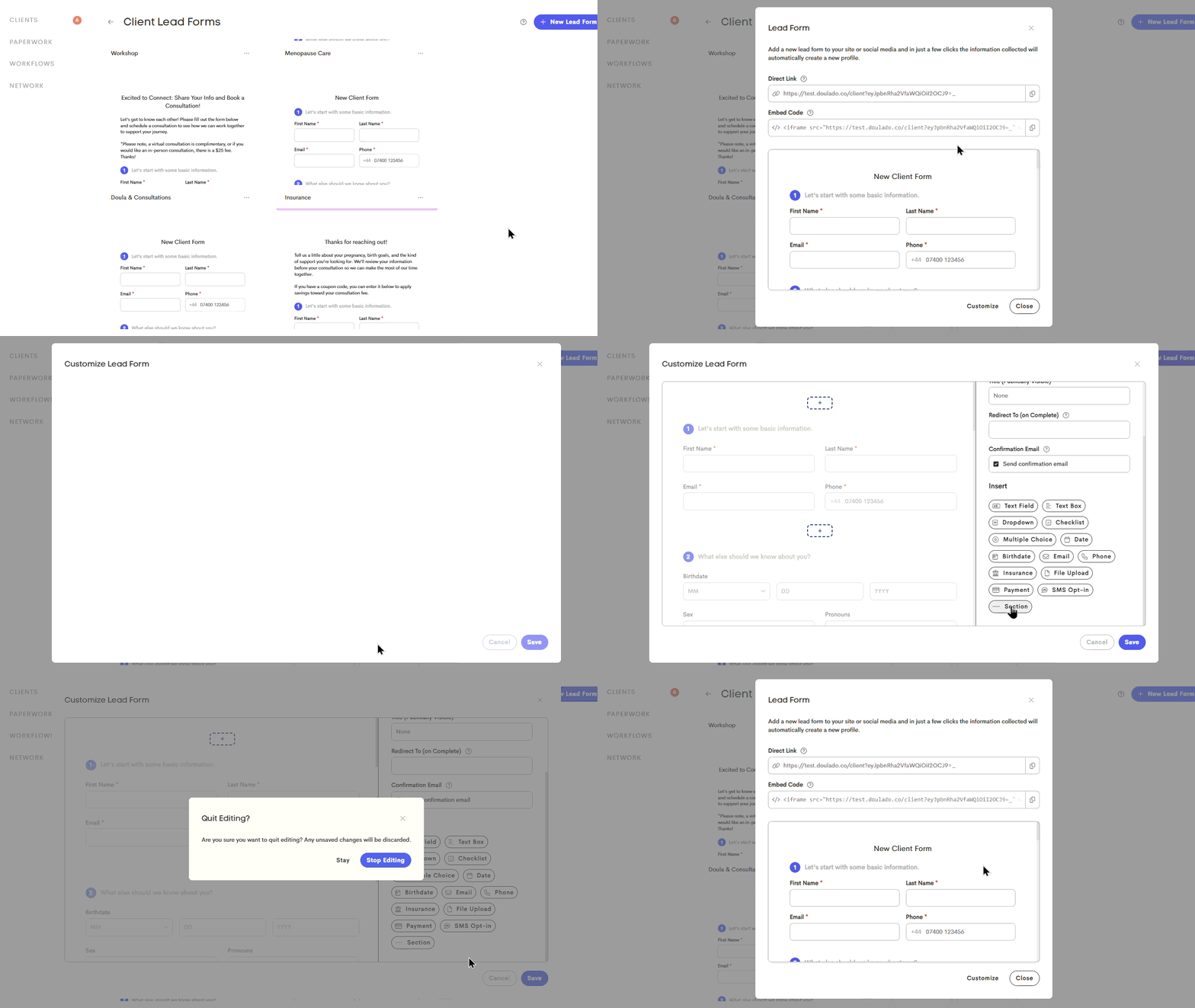
Check out this article for more information on customizing Lead Forms!
-
Duplicate details when merging journeys: We've updated how duplicate client details are handled during the merge process.
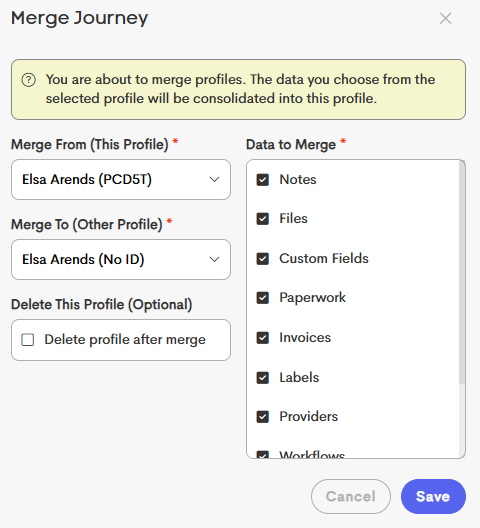
When you merge Client Profiles with the same name, you can now choose which information to include by selecting the corresponding fields. When duplicate information exists:
- If the same Profile Info field (custom field) exists in both journeys, Doulado will keep the version that contains information.
- If both journeys have a value for a selected field, Doulado will keep the value from the journey you are merging into.
To see more information about merging, check out this article: Merge Client Journeys
-
Booking page flow change: Clients can now browse available appointment types and times before completing email verification, and submitting their personal information!
Verification will take place after a timeslot is selected, helping clients move through the booking process more naturally without having to verify their identity upfront.
This creates a smoother booking experience by letting clients focus on finding a time that works for them first, then completing verification or submitting their lead form details before confirming the appointment.
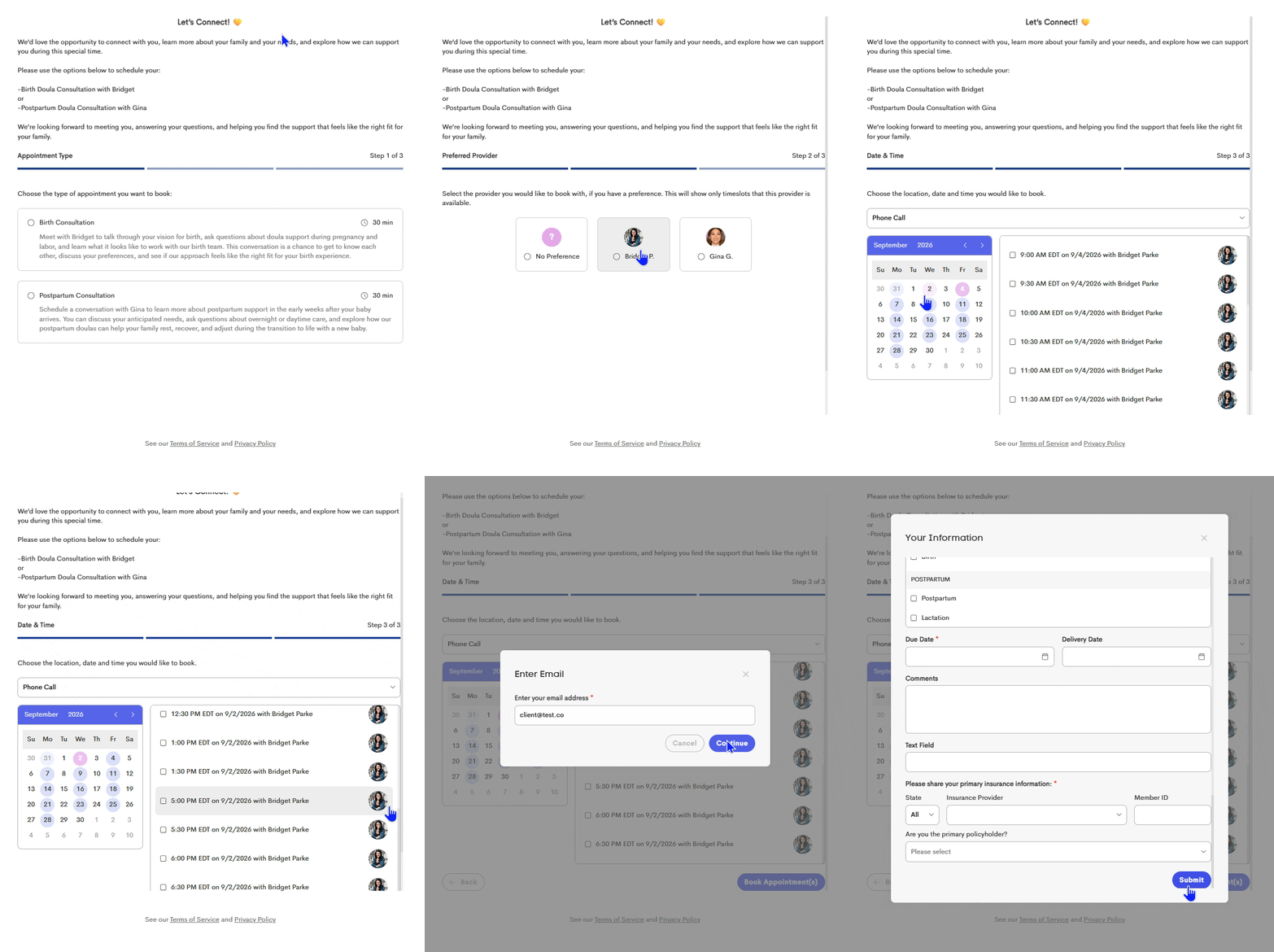
This new booking flow will automatically be applied to your existing booking pages. No action is required on your end! Once the update is released, your existing booking pages will use the new flow automatically.
#3: Paperwork & Client Communication
-
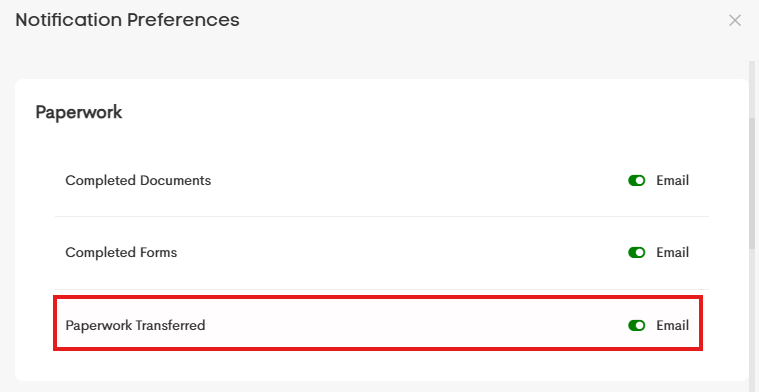
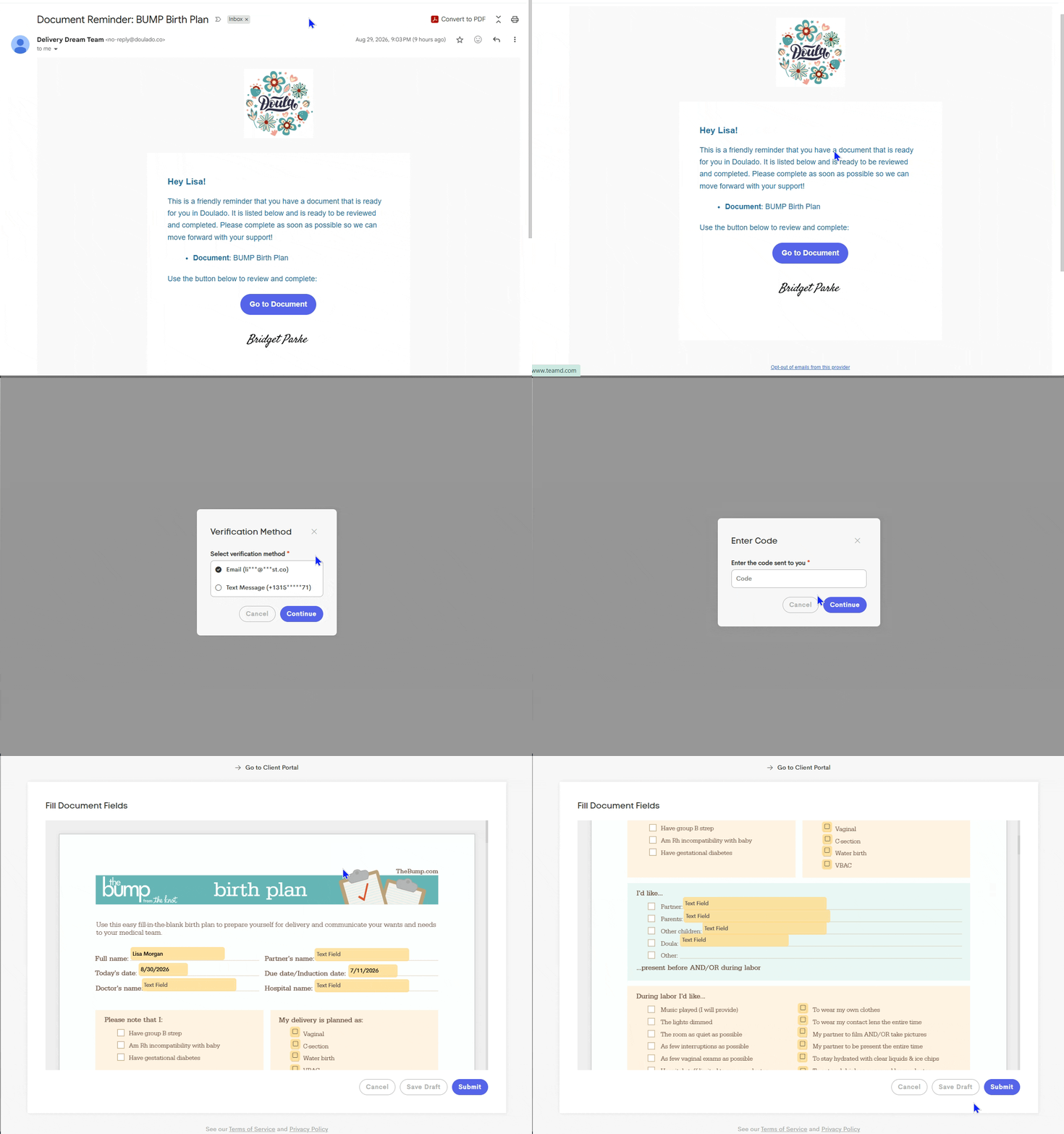
Paperwork transfer notifications: Doulas now receive a notification whenever another provider transfers paperwork to them.
A new notification preference has been added to let you choose whether you'd like to be notified when paperwork is assigned to you through a transfer. This helps you stay informed about newly assigned documents without having to manually check for updates.
Here's a sample of the notification you can get if you have this notification turned on:
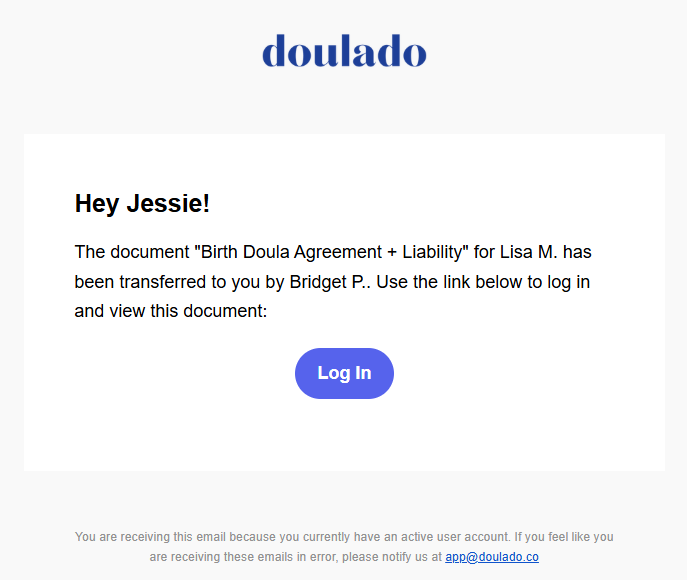
To avoid unnecessary notifications, you won't receive an alert when you're the one who initiated the transfer.
-
More control over verification code delivery: Clients accessing a secure link from an unrecognized device will now be able to choose where their verification code is sent instead of having it sent automatically. This makes it clear where they should expect to receive the code they need to verify their identity and securely access the link.
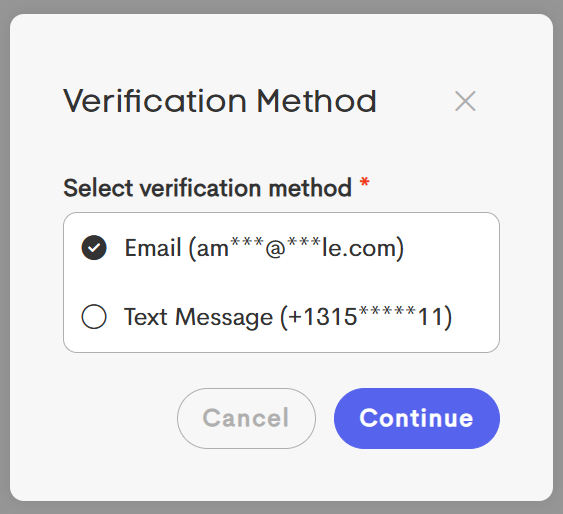
If a mobile number that has opted in to receive text messages is saved to the client’s profile, they can also choose to receive the code by email or SMS. This gives clients more flexibility while keeping access to their information secure.
-
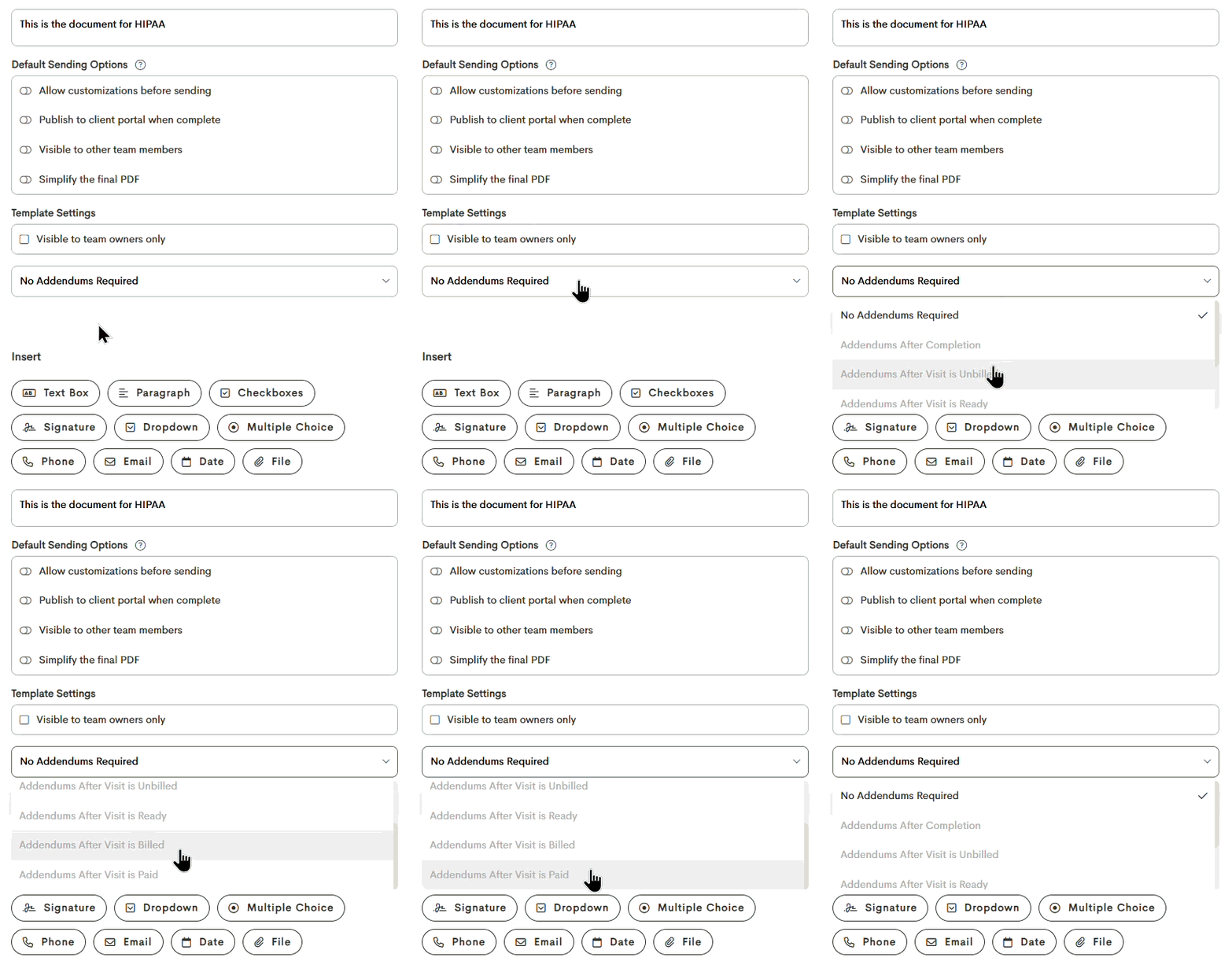
Paperwork addendum settings are now more flexible: You can now choose when paperwork becomes locked when addendums are enabled.
A new Addendum timing setting lets you lock paperwork either when it is first completed or when the related visit's status is set to a certain status. This gives you more flexibility to make necessary updates before billing while still requiring any later changes to be recorded as addendums.
By default, paperwork templates that had addendum requirements set, will continue to lock once completed unless you select the a new option.
-
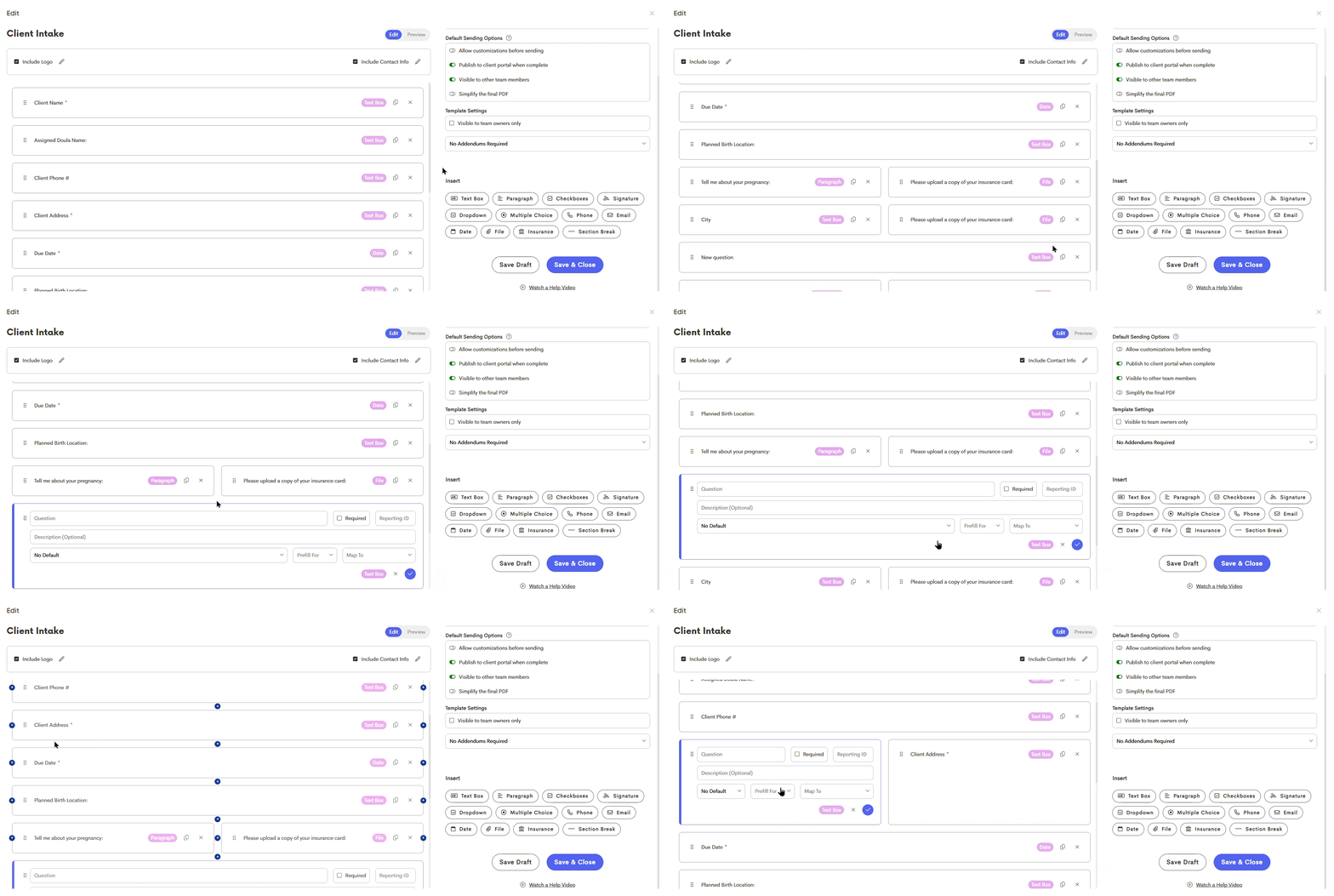
Form editing now keeps your place: When adding fields to a form template, Doulado will now keep your position on the form more consistent instead of shifting the questions on your screen.
This reduces unnecessary scrolling and makes it easier to continue working exactly where you left off while customizing your forms.
-
Team Owners can now transfer paperwork: Team members with the Owner role can now transfer paperwork between providers, even if they were not the original provider who created it.
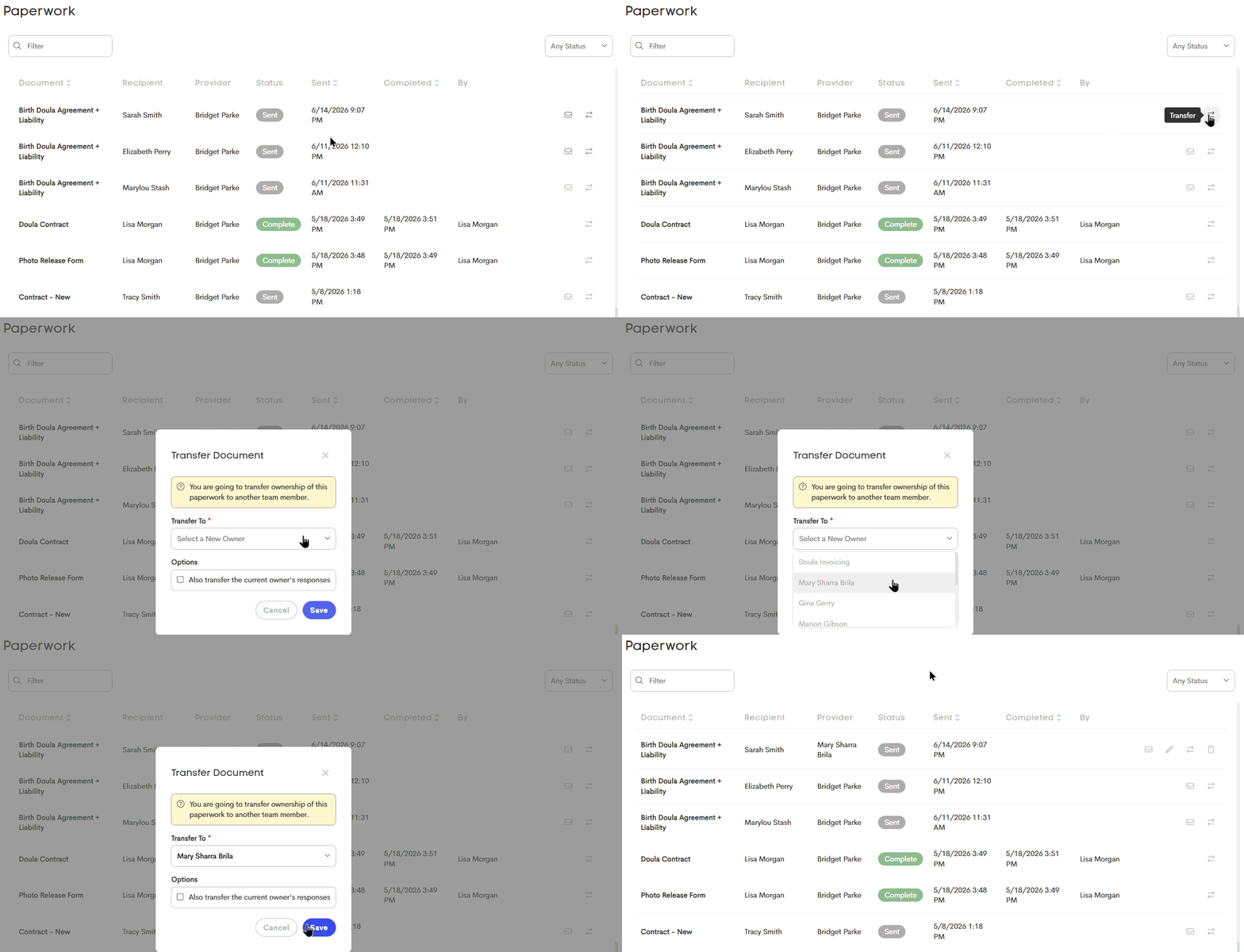
When paperwork is transferred, Doulado will also record the activity in the Client Journey Timeline, including the paperwork name, who transferred it, who it was transferred from and to, and when the transfer occurred.
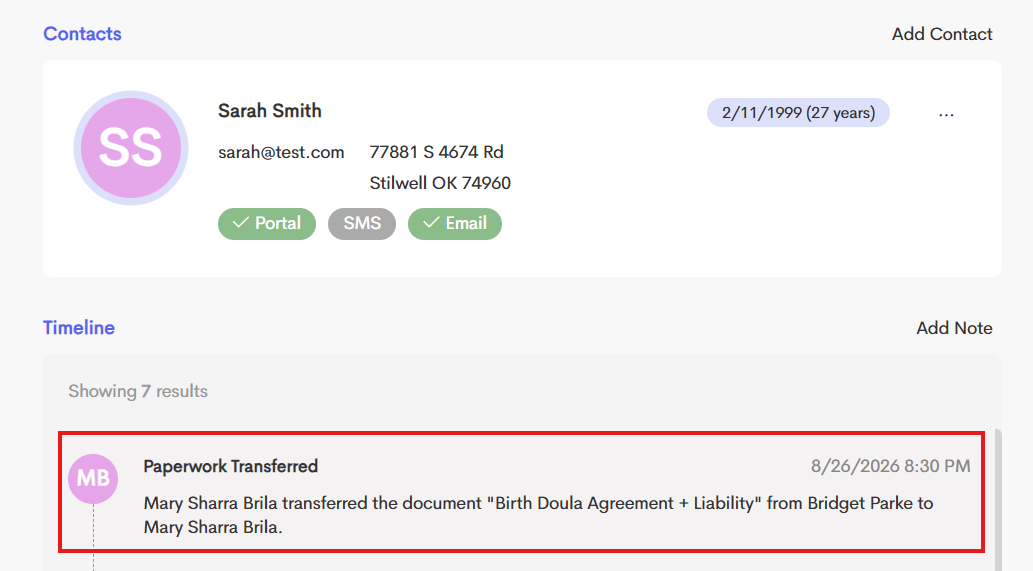
This gives Team Owners more flexibility to correct or reassign paperwork when the original provider is unavailable, while also storing the logs of any paperwork transfer in the journey timeline!
#4: Team Management
-
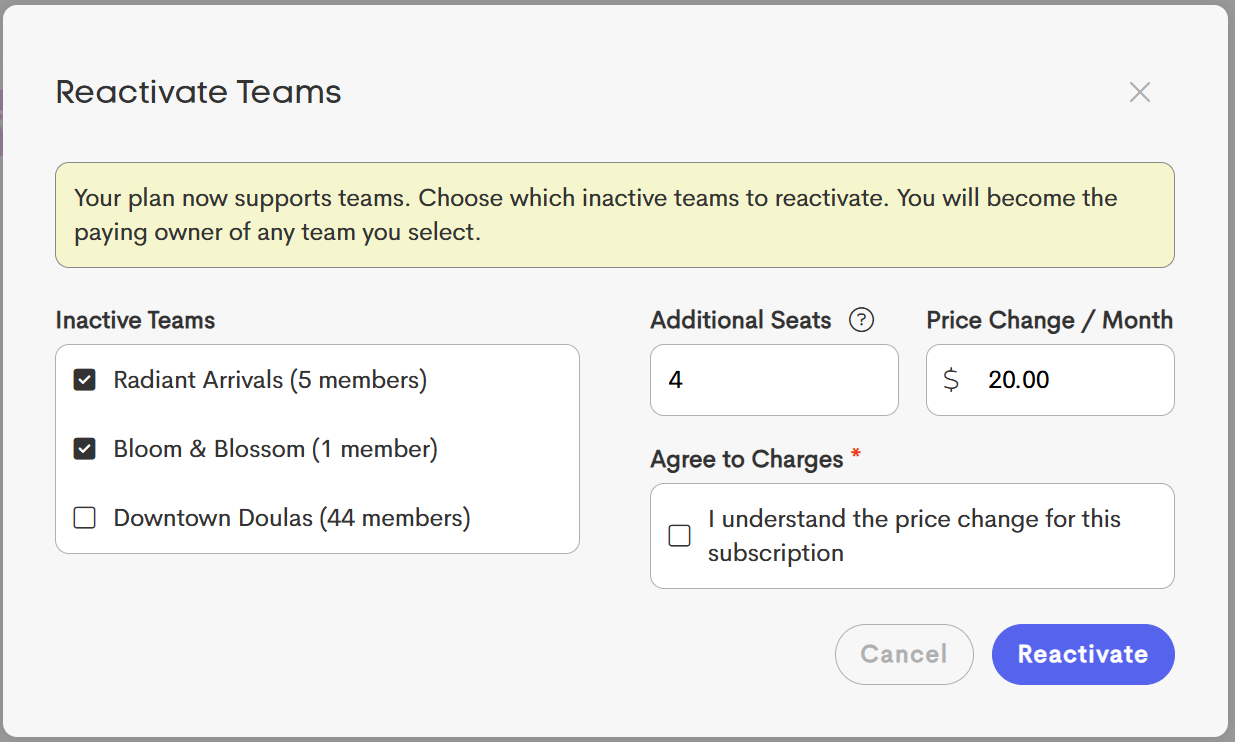
Reactivating Teams is now easier: If you're resubscribing to a Premium or Impact plan, Doulado now makes it easier to restore your previous team(s) setup.
During the resubscription process, you'll have the option to reactivate any inactive teams that you own without needing to restore each one individually.
If the selected teams include existing members, Doulado will also recommend the number of team seats needed to accommodate everyone, helping you get your team back up and running more quickly. This streamlined process makes it easier to resume your subscription and continue collaborating with your team.
- Participant claim viewing: When a participant team member creates a claim and selects a claim they did not create in the Copy From dropdown, sensitive information from the original claim should be protected:
- When the participant clicks View, all PHI and potentially sensitive information, such as the NPI and Tax ID, should be redacted.
- When the participant clicks Continue, this sensitive information should not be carried over to the newly created claim.
This allows participants to access claims within their team when needed while keeping their individual billing and identifying information private from other doulas on the team.

- New client transfer permission setting: Team owners can now control which team member levels are allowed to transfer client journeys into the team. This applies to clients being transferred from another team or from a user's personal client area, and can be found in the client list "Settings".

Only team Owners can transfer client journeys away from the team. This setting specifically controls who can transfer client journeys into the team.
#5: Billing & Payments
-
Processing payments are now reflected on invoice status: When an invoice has a payment that is still processing, the invoice will now display a Processing status instead of appearing as Paid.
This will most commonly apply to bank account payments, which can take longer to process through the bank than debit or credit card payments. Previously, an invoice could appear as Paid even while the payment was still processing. Now, the Processing status gives you a clearer indication that the payment has been initiated but has not yet fully completed.

Once the payment has finished processing successfully, the invoice status will update to Paid. This makes it easier to distinguish between completed payments and payments that are still pending, so you have a more accurate view of the invoice's current payment status.
- Start billing from calendar events: The billing icon available in the Visit Log is now also available in the calendar visit window, making it easy to start a new claim or invoice directly from the calendar.

