
Tax on Invoices
To add a calculated tax on your invoices, you can create a service (percentage-based) for each required tax rate.
Contents
Creating the service
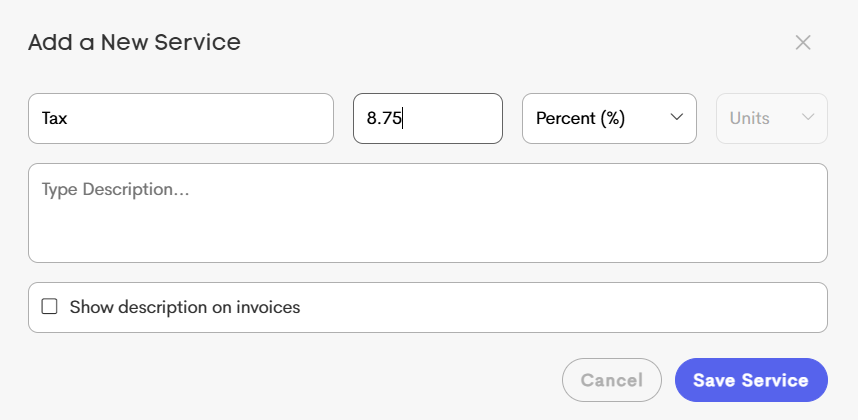
When creating the service that will apply taxation:
- in the quantity field specify the rate of taxation as a percentage (e.g. 8.75 for 8.75%)
- change Amount (#) to Percent (%)
Creating the Invoice
When creating the invoice that should include tax, ensure the taxing invoice item is below invoice items which should be taxed, and above invoice items that should not be taxed.
It can also be a good idea to leave Date empty on the taxing invoice item, to help reinforce that it is an adjustment of other items rather than representing a service.
The price field of a taxing (percentage-based) invoice item represents the post-calculation dollar value that will be applied to the invoice by that tax item.

Invoice Items Taxed at Same Rate
The following is an example of how an invoice could be setup, if one service is taxable but another cannot be taxed.

Multiple Tax Rates in the Invoice
If the same tax rate doesn't apply to all invoice items, you can spread the taxation amount out among multiple taxing invoice items.
In the following example:
- the first service item (dark blue) needs a 3% tax added, so it sits above both a 1% taxing item as well as a 2% taxing item, resulting in that service item having a combined total tax amount of 3%.
- the second service item (light blue) needs a 2% tax added, so it sits above the 2% taxing item, but below the 1% taxing item, resulting in that service item having a total tax amount of 2%.
