
Payment Schedule
Every invoice includes at least one payment. You can choose to collect payment all at once or split the total into multiple payments using a payment schedule.
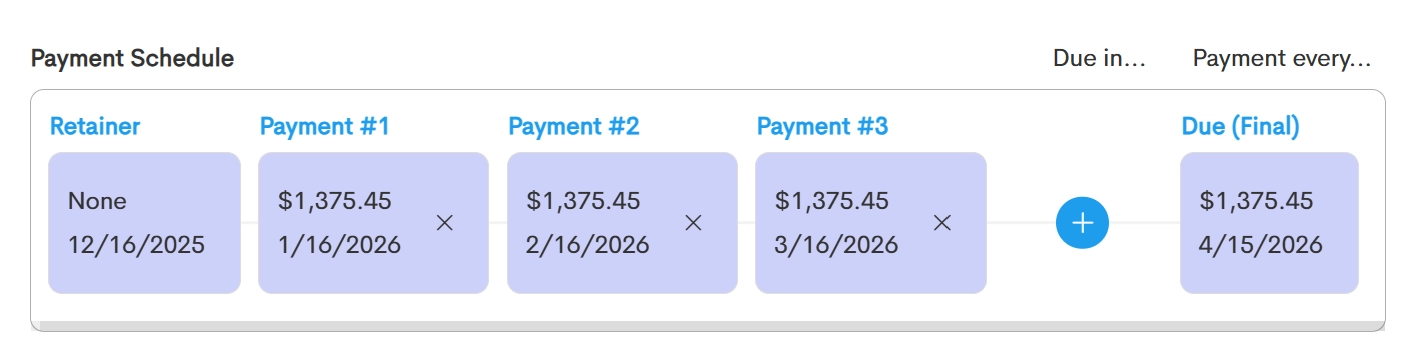
A payment schedule can include:
- Retainer (Optional): An upfront payment that's due as soon as the invoice is sent. You can also set this to $0 if no payment is required before the due date.
- Installments (Optional): Additional payments scheduled between the retainer and the final payment.
To learn how to create custom invoice installments, check this article: Invoice Installments
- Final Payment (Required): The remaining balance due. The due date of this payment becomes the overall due date for the invoice.
Create a Payment Schedule
By default, the total invoice amount is assigned to the Final Payment. If you'd like to split the balance into multiple payments, you can add a retainer or installments and customize the payment dates yourself, or let Doulado calculate the schedule for you.
To create a schedule, you can use the following menus:
Due In...
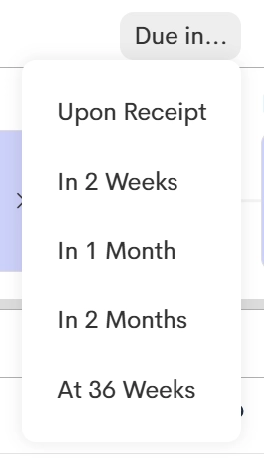
Use the Due In menu to quickly set the due date for the Final Payment based on the invoice date.
If your client has a Maternal Health label, you'll also see an At 36 Weeks option. Doulado uses the client's due date to automatically calculate a payment due date when they reach 36 weeks of pregnancy.
For more information on how labels work, check this article: Labels
Payment Every...
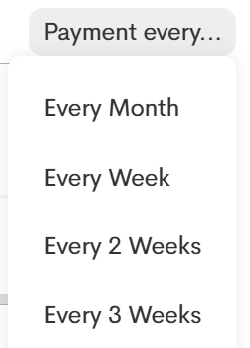
The options in this menu automatically divide the invoice total into equal installments based on the selected schedule, from the invoice date through the final payment due date.
If the total can't be divided evenly, any remaining amount will be added to the Final Payment.