
Retainer, Due Dates and Installments
Retainer
A retainer is the upfront portion of an invoice that is paid before services are provided. You can use a retainer when you require a client to pay a specific amount in advance, such as to secure your services.
The retainer is part of the total invoice amount, not an additional charge. Once the retainer is paid, the amount is deducted from what remains to be paid on the invoice.
Example:
For a $500 invoice with a $100 retainer, the client pays $100 upfront, leaving $400 remaining to be paid according to the invoice's payment schedule.
A retainer is optional. If you do not require an upfront payment, you do not need to enter a retainer amount.
Installments
If you want to break up the payment schedule over a period of time, you can edit the payment schedule in conjunction with a future Due selection.
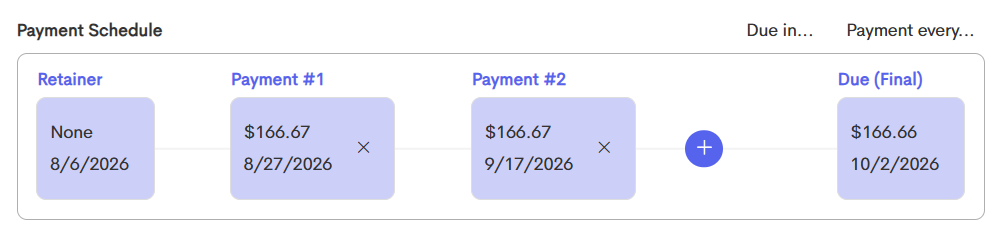
The time until due is divided evenly into the number of periods you select for installments, and the invoice amount is also divided evenly. These dates and payment amounts can be customized individually if desired.
If a deposit is added to the payment schedule, that amount is due at time of billing (invoice date), and the remaining balance is the amount divided up into installments.
To learn more about custom invoice installments and creating them, check out this article: Invoice Installments
Email Notifications
Doulado can automatically send email notifications to help keep your clients informed about their invoices and upcoming payments.
Depending on the invoice and payment schedule, notifications are sent at key points throughout the billing process:
- Invoice is initially created:

- 3 days before a payment is due (whether it is 1 installment, or total invoice):

- 1 day after it is overdue (when it is the final due date):

If the box for Send email reminders is unchecked when creating the invoice, it will not send these email notifications.