
Cancelling Your Plan
If for some reason Doulado did not meet your needs, you can pause or cancel your plan.
Before you cancel, please feel free to reach out to us at support@doulado.co to let us know how we can better serve you and give us the chance to make it right.
Your free trial will last 14 days, and after that the credit card you entered will be charged the subscription rate you signed up with.
- You will receive a reminder email 2 days before your free trial is up.
Due to our refund policy, Doulado will not be able to provide a refund after the trial period has ended.
If you are ready to cancel your plan you can follow these steps:
- Open you User Profile and click on Modify Plan.

-
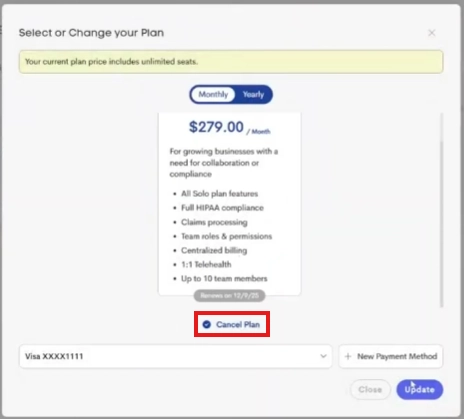
Select Cancel Plan under the plan selection and click Update.
-
A confirmation pop-up will show you details on how long your current plan will remain active, and the impact on your account and associated teams.
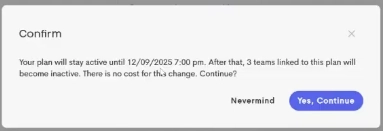
- Click Yes, Continue to finalize your change.
The cancellation will be reflected in your account activity and team access on the indicated date.
Upon Cancelling your Plan:
- You can access no more than one client journey (the earliest created one) in your personal business (e.g. 'Personal Clients').
- You no longer have the ability to create and manage teams.
Before canceling your plan, we recommend downloading any forms or client data you may need, as access will no longer be available once your billing cycle ends.
If you are the paying owner of a team, it will also become inaccessible at that time. Your data will not be deleted automatically.
If you choose to restart your subscription later, you can reactivate your team and regain access to everything.