
Security Update: Device Verification for Client Links
Overview
As part of Doulado's ongoing commitment to security, compliance, and protecting sensitive client information, we've released an update that adds an extra layer of authentication when clients access secure links from a new device.
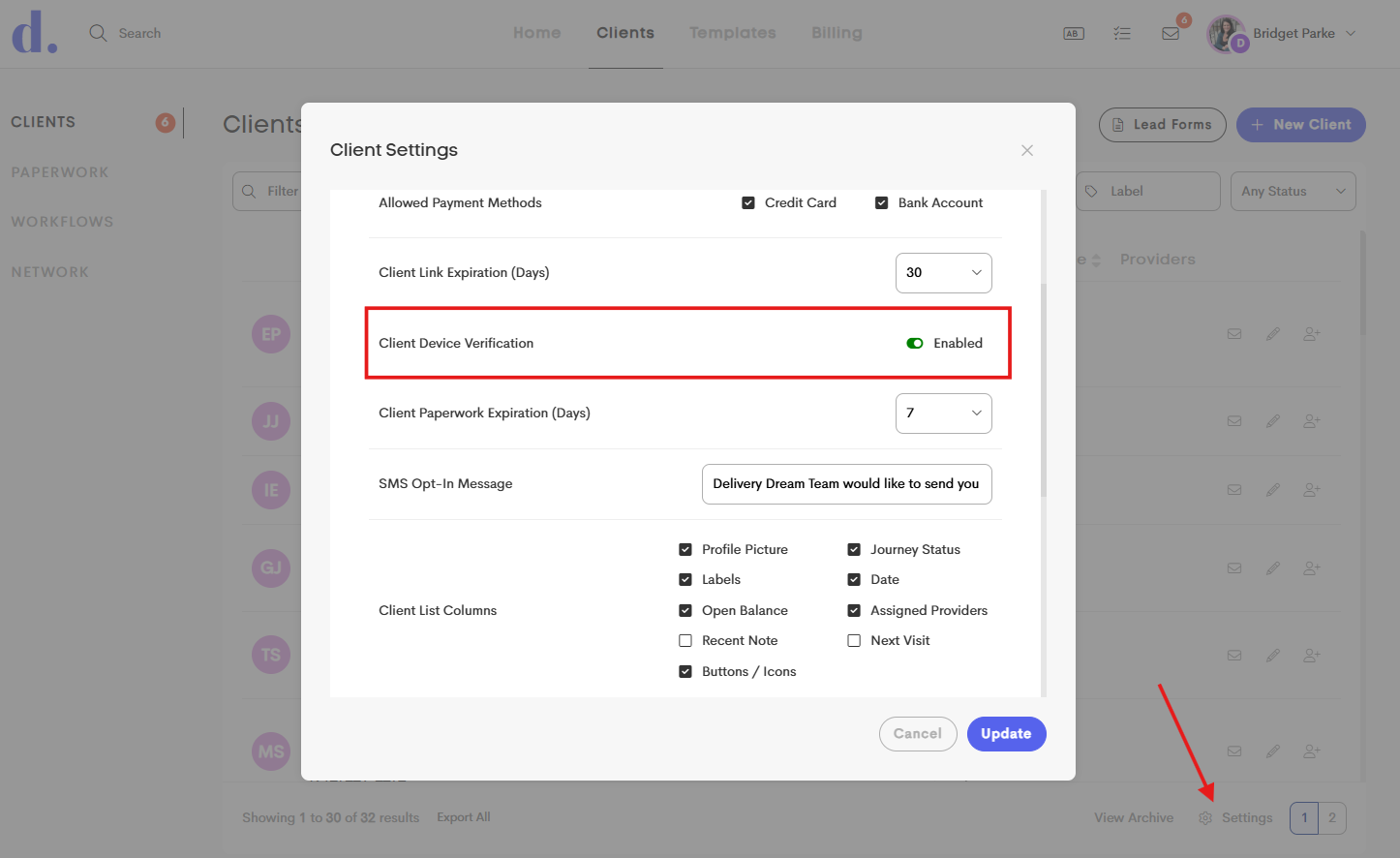
This enhancement helps ensure that only the intended recipient can view secure documents, messages, forms, and files shared through Doulado. If you'd prefer to turn off this extra verification step, you can disable it in your client settings.
What's Changed?
The overall experience remains the same. The only difference is that the first time a client opens a secure Doulado link from a device, they'll be asked to verify that device.
Examples of secure links include:
- Messages
- Documents
- Forms
- Visits
- Shared files
- Other notifications sent by email or text
Once a device has been verified, clients can continue accessing secure links from that device without completing the verification again.
This setting is enabled by default, but can be disabled under your Client Settings (Client device verification). These settings can be customized by team owners or account owners on their personal clients tab. When the setting is disabled, or enabled, it affects all client notification links immediately.
How Device Verification Works
The first time a client opens a secure Doulado link on a device after this update:
- They'll receive a 6-digit verification code by email.
If a client clicks a notification link multiple times, Doulado will only send one verification code every 5 minutes. This helps prevent multiple codes from being sent at once, making it clear which code the client should use.
- They'll enter the code into the verification screen.
- That device will be trusted for future secure links.
For example:
- If a client opens a secure link on their phone, they'll verify that phone once.
- If they later open a secure link on their computer for the first time, they'll verify that computer once as well.
After each device has been verified, future links will open normally.
Why We Made This Change
We regularly review our security and compliance practices to ensure we're protecting client information as effectively as possible.
Previously, anyone with access to a secure link could potentially open it if the link was intercepted or shared. Device verification adds another layer of protection by confirming that the person accessing the link is the intended recipient.
This update supports our commitment to safeguarding client information and maintaining strong HIPAA-compliant security practices.
Will This Create More Work for Clients?
Very little. Most clients will only need to complete this verification once per device. After that, their experience remains virtually unchanged.
While this adds one small step initially, we believe it's well worth the additional protection it provides for both your clients' information and your practice.
If a client clears their browser's cache, cookies, or browsing data on a device, they may be asked to verify that device again the next time they open a secure Doulado link. This is expected behavior and helps maintain the security of their information.
Questions?
If you or your clients experience any issues with device verification, please contact support@doulado.co and our team will be happy to help.