
December 2025
This release brings a purposeful mix of updates designed to better support your day-to-day work while ensuring Doulado remains sustainable, reliable, and aligned with the evolving needs of doula businesses. From updated plans and pricing to improvements across visits, insurance, billing, eligibility, and scheduling, each change was made with care; guided by community feedback and a commitment to long-term support for doulas. Below, you’ll find a detailed overview of what’s new, what’s changed, and how these updates can help you work more smoothly and confidently within Doulado.
#1 Updated Plans & Pricing
We want to start by saying thank you. Doulado exists because of the incredible community of doulas who have trusted us, shared feedback, and helped shape this platform over the past few years. From the very beginning, our goal has been to support sustainable, heart-centered doula care, and that commitment has not changed. We remain deeply dedicated to maintaining Doulado and continuing to make it the best possible tool to support your work and your clients.
As Doulado has grown, so have the features, infrastructure, and care required to keep the platform reliable, secure, and evolving alongside your needs. To ensure we can continue improving the product while remaining sustainable for the long term, we’ve made the thoughtful decision to move away from a sliding scale pricing model and instead introduce pricing that better reflects feature levels and usage.
With this release, and our first pricing adjustment since launching in 2023; we’re introducing new plans and pricing options designed to be clearer, more predictable, and better aligned with how different doula businesses operate. These changes also allow us to make features like HIPAA Compliance and Claims submission more accessible by adjusting pricing and seat allocation, so growing practices can customize a plan size that truly fits.
We want to reassure you: if you’re an existing subscriber, your current pricing will remain the same. While things may look a little different moving forward, these updates are about creating a stronger, more sustainable foundation; one that allows us to continue supporting doulas for years to come.
Below, you’ll find details on the new plan options and pricing structure effective 12/28/2025.
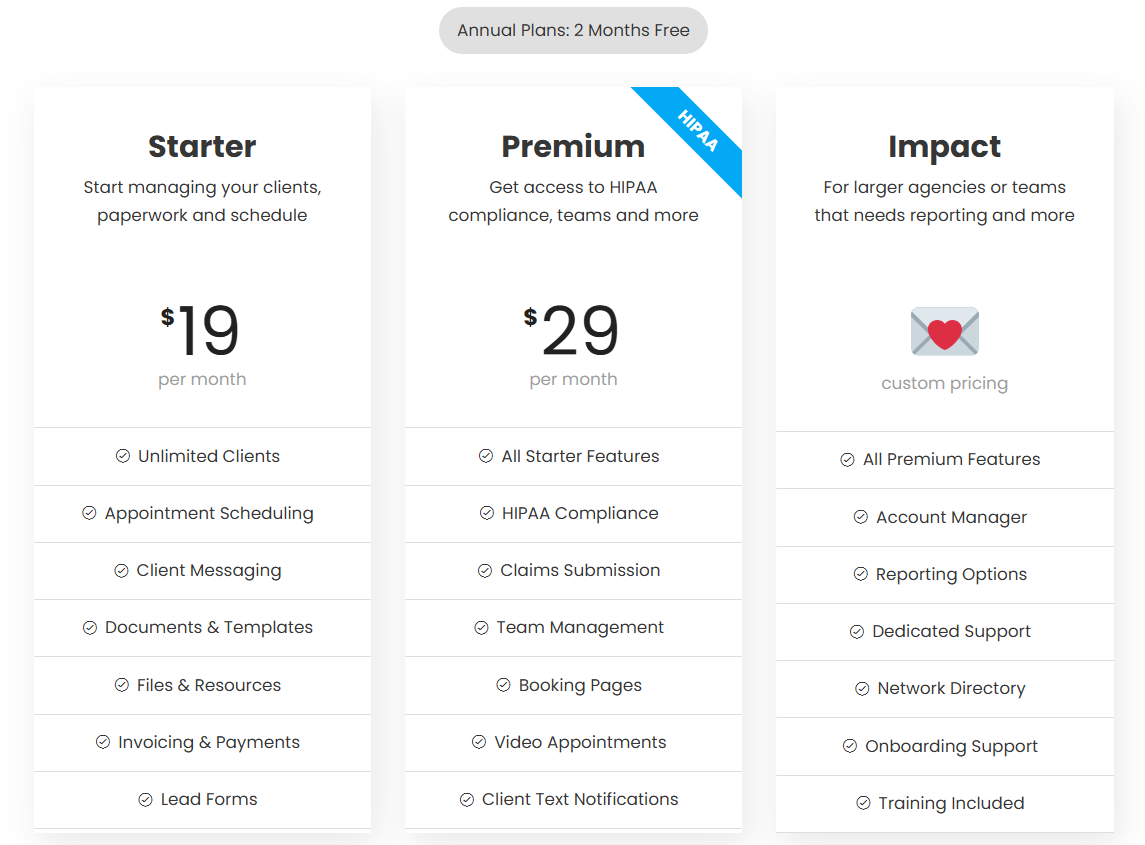
Please note that anyone with an active subscription will be grandfathered into their current pricing, provided they maintain their current subscription. Any modification or cancellation will result in that subscription price being forfeited.
#2 Visits and Journeys
- Visits now visible without team membership: Provider and visit information can now be seen even after a doula has been removed from your team. Previously, the visit would move to an "all team members" assignee, so it would be hard to tell who that visit was supposed to be assigned to. The team member who has been removed will now still show up in the “provider” field, but the doula will not have access to visits linked with events belonging to your team.
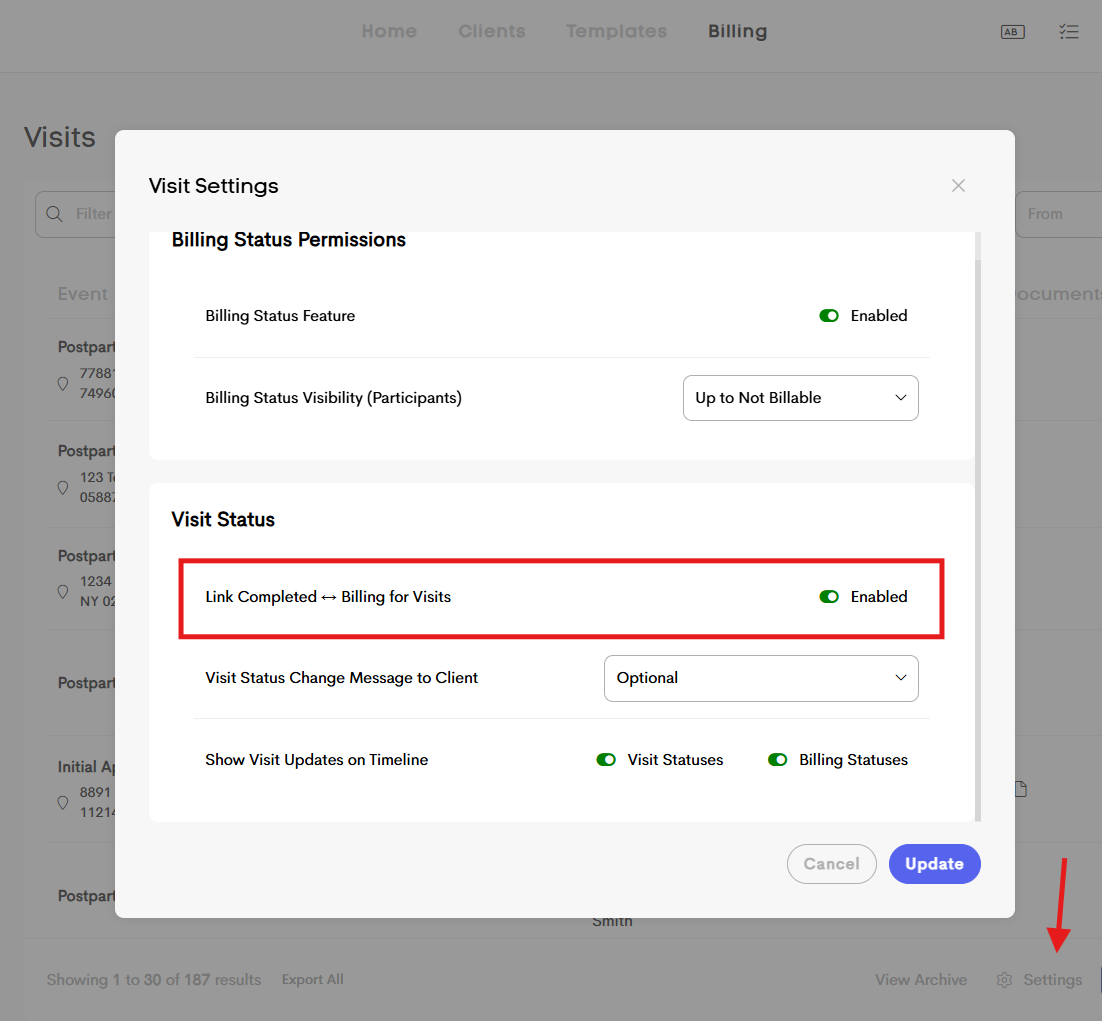
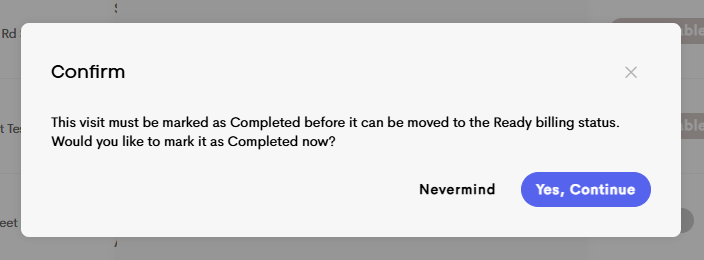
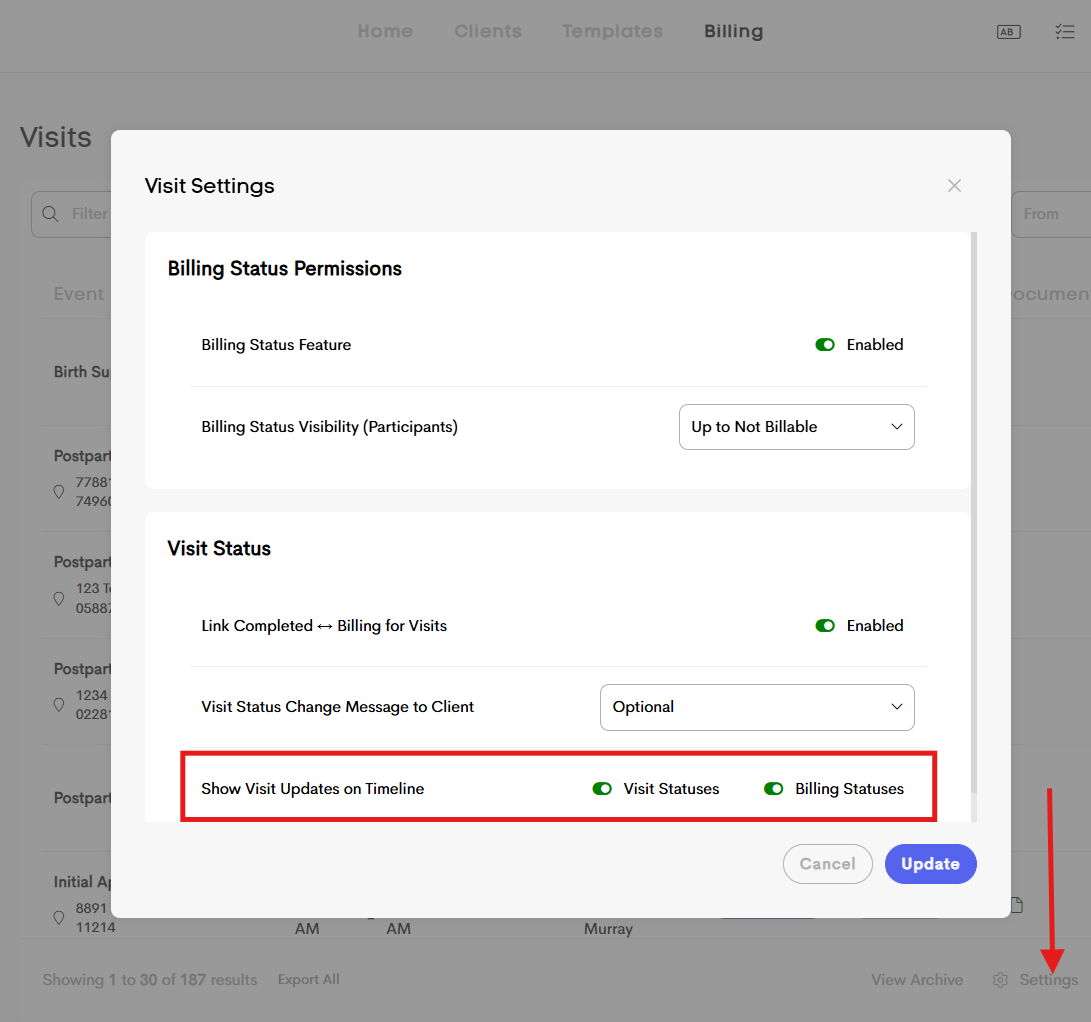
- Visit Status Transition: Improved logic around visit status changes to ensure transitions behave predictably and align with billing and reporting. In your Visit>Settings, you can enable the “Link Completed ↔ Billing for Visits” option. With this on, this will prompt the following message to doulas to remind them that the visit status needs to be marked as “completed” before moving the billing status to “ready”.
- Automatic change of visit status: When a client journey was deleted previously, the client's link to existing events didn't change. Now, when a journey is deleted, any visits with a status of "Scheduled" will be automatically updated to "Cancelled."
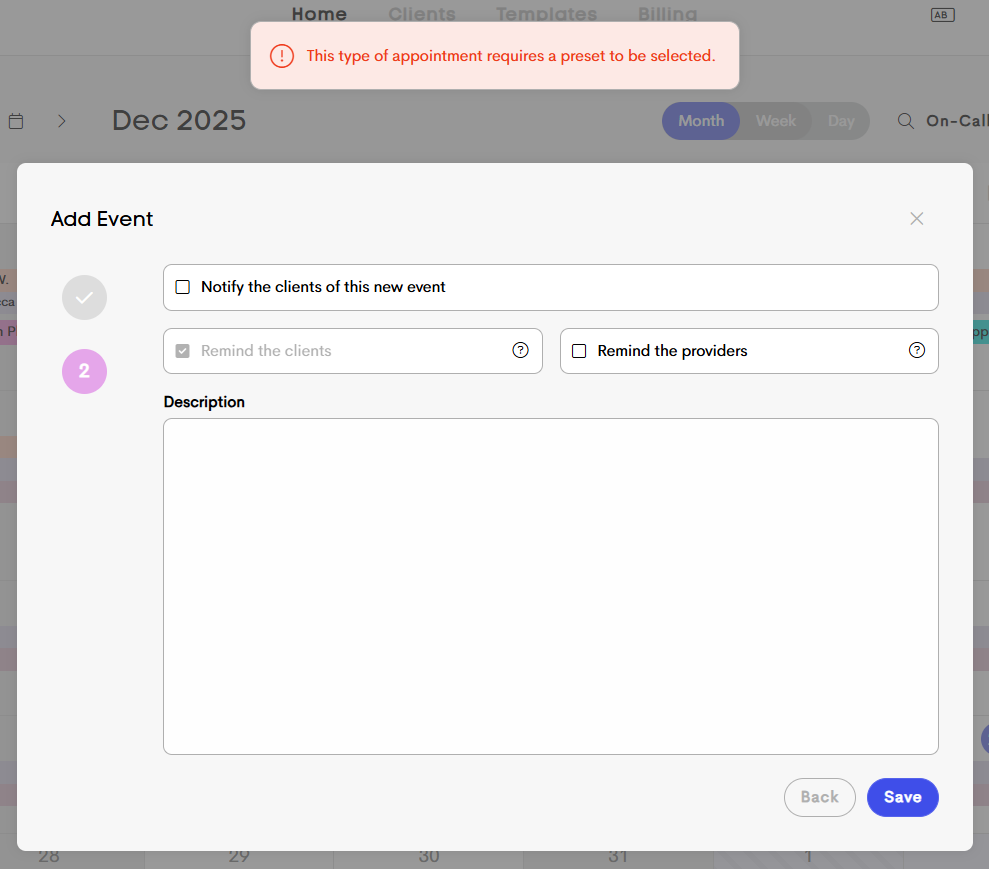
- Visit Preset Requirement: In your Calendar Business Settings, you can now require preset appointment templates be used for all client appointments or all appointments, ensuring consistency and preventing incomplete or misconfigured visits.
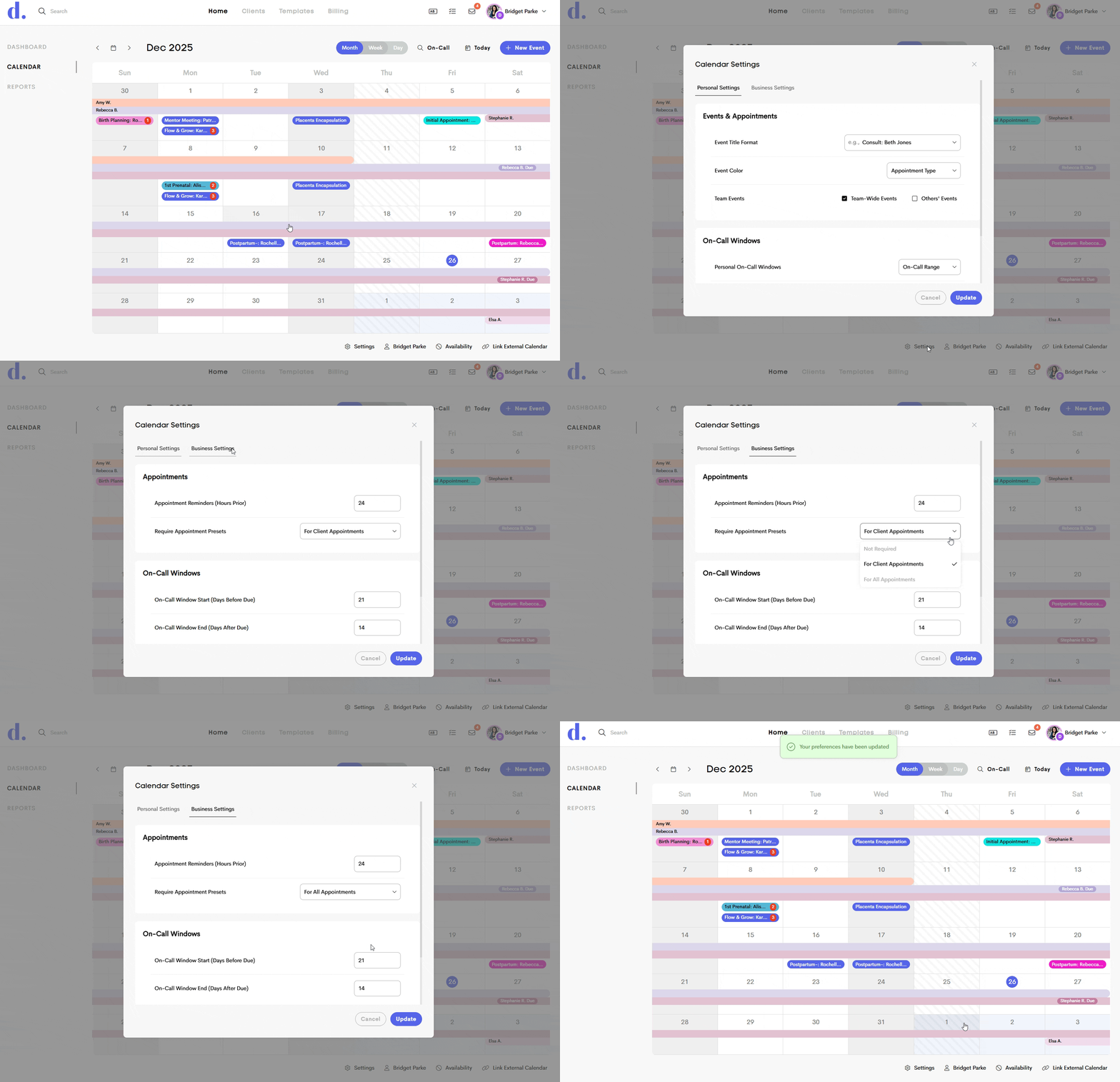
If the appointment preset requirement is on, doulas will see an error message if they did not use a preset when logging a visit.
#3 Lead Form Insurance Updates
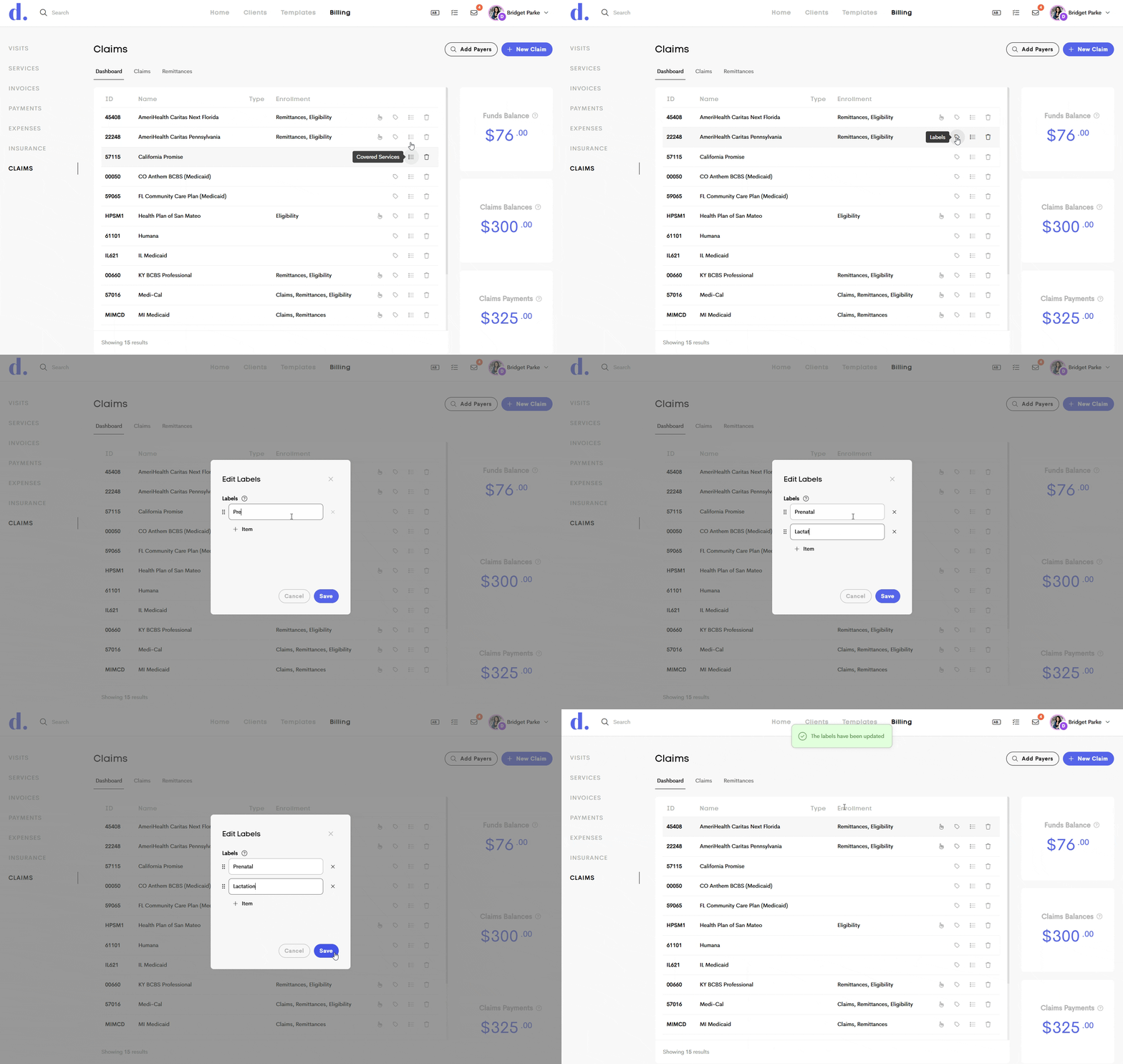
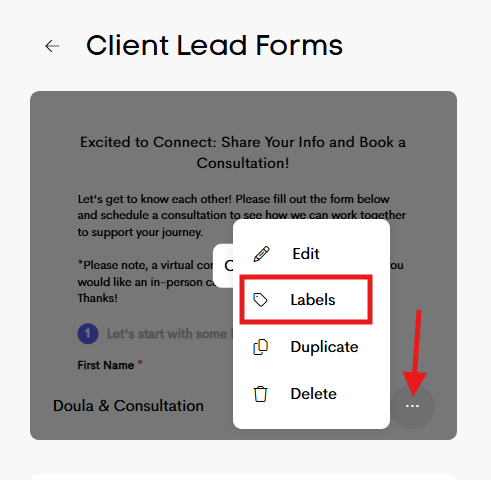
- Lead Form & Payer labels: We’ve added customizable labels to payers to help you better organize and identify them. These same labels can also be added to your lead form, making it easier to connect clients and service types with the right payer from the start. Using these labels, you can now limit which payers are available to be selected in a particular lead form.
- Payer Labels: Click the label icon in a payer row to add labels, entering one label per line. Labels can reflect covered services, service codes, or any other identifiers that help define what each payer covers.
- Lead Form Labels: Go to your lead forms and click the three-dot menu. Select Labels, then add the labels that match the payers you want to be available on that lead form.
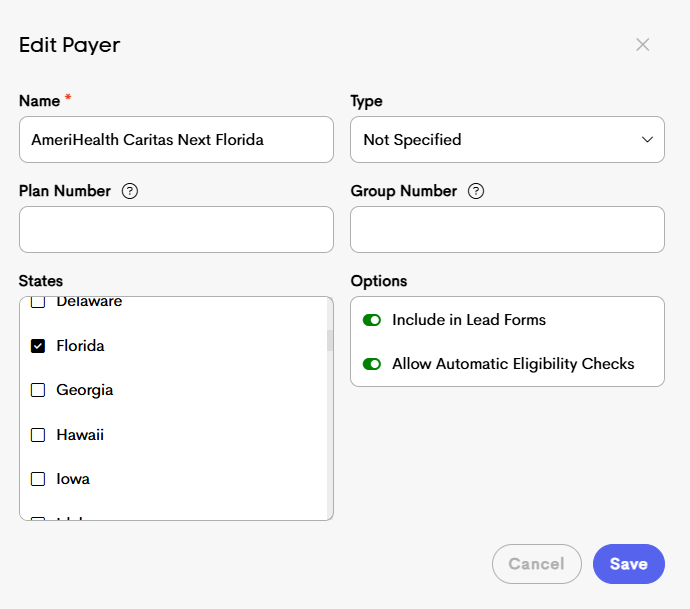
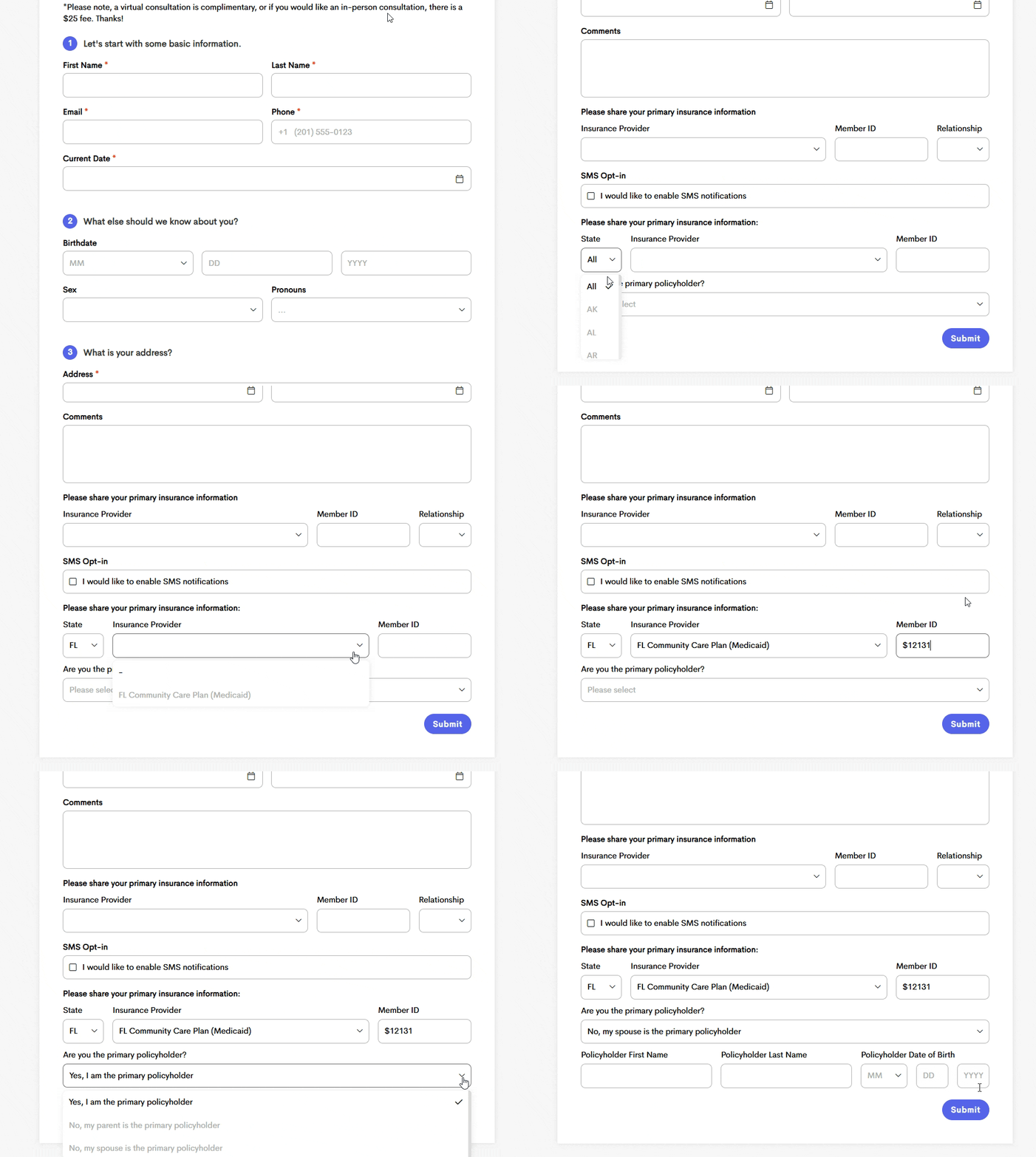
- Payer details: Previously, you could edit the name of the payer after you imported it into your dashboard. Now you can optionally add an associated plan number, group number, state, and edit other options! You can access this by clicking on the payer name in your claims dashboard. When running eligibility checks, coverage will only be marked as active if the returned plan and group numbers match the information on file (if stored). If the response does not align with the expected values, the coverage will not be marked as active
Please Note:
If a Plan Number is provided, valid eligibility checks need to match this plan number.
If a Group Number is provided, valid eligibility checks need to match this group (program) number.
If the State isn't assigned to the payer in your claims dashboard, and the client selects their state in the lead form, it may not show them any options. Each doula or team needs to assign states to payers accordingly, especially if you are collecting insurance information in a lead form. Alternatively, the client could skip selecting their state and see all of the options.
If Include in Lead Forms is toggled on (green), that payer will appear as an option in the "Insurance Provider" dropdown.
If Allow Automatic Eligibility Checks is toggled on (green), and any automated checks are turned on in Client Settings, it will allow those to run automatically.
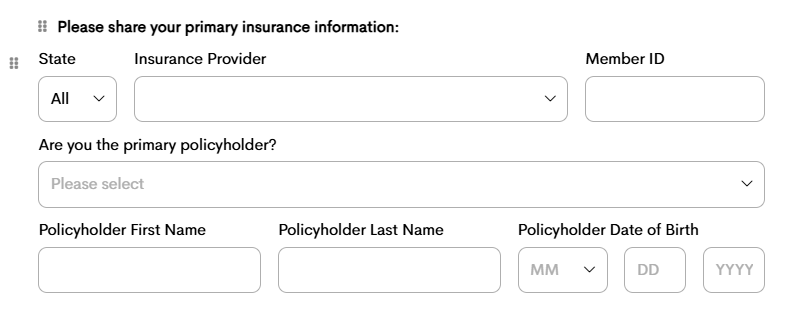
- Insurance changes: You can now collect and store additional insurance details in the client journey’s insurance coverage using new lead form fields. To access the updated fields, customize your existing lead form by removing the current insurance field and adding it again. If the client is not the primary policyholder, additional fields will appear to capture the primary policyholder’s name and date of birth.
|
|
|
|
Before |
Updated Fields |

#4 Billing, Eligibility, and Claims
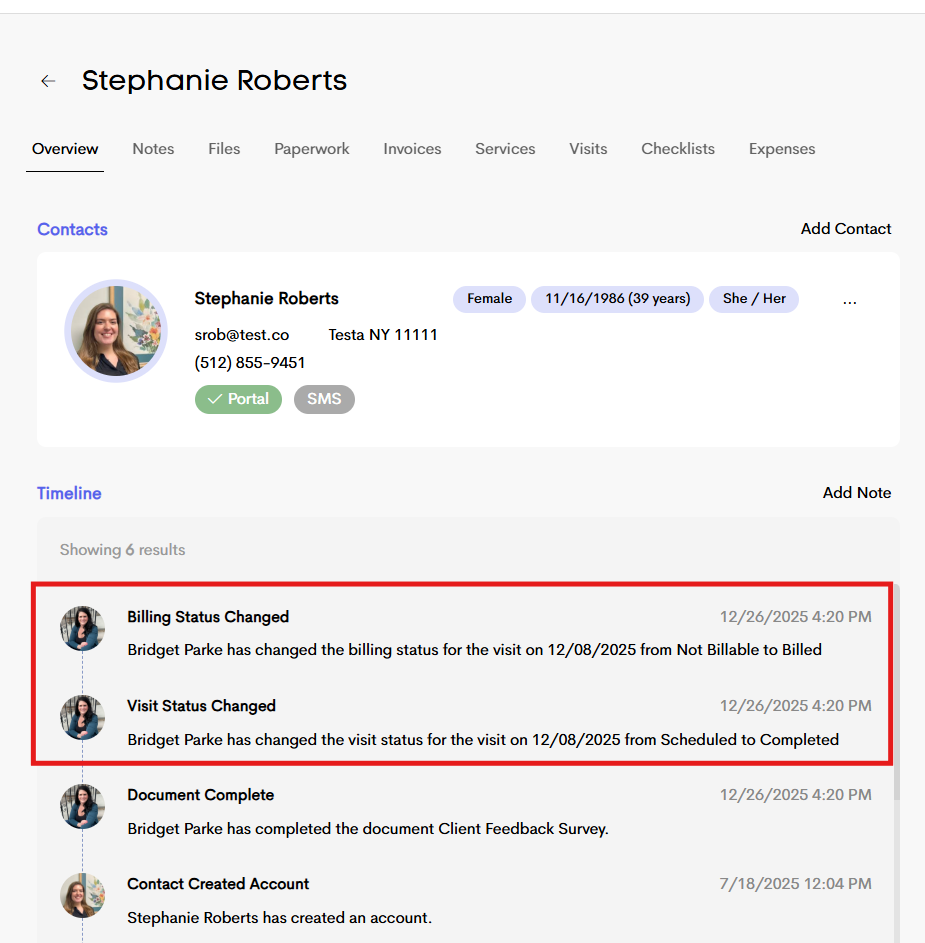
- Visit & billing status change visibility: You can now choose whether visit status changes and billing status changes appear in the client journey timeline. When enabled, the timeline will automatically record each update, making it easy to see when something changes and who made the change. For example, you’ll see entries like: “Amelia Smith changed the billing status for the visit on 11/27/2025 from Ready to Billed.” This helps keep a clear, shared record of a client’s care and billing progress over time.
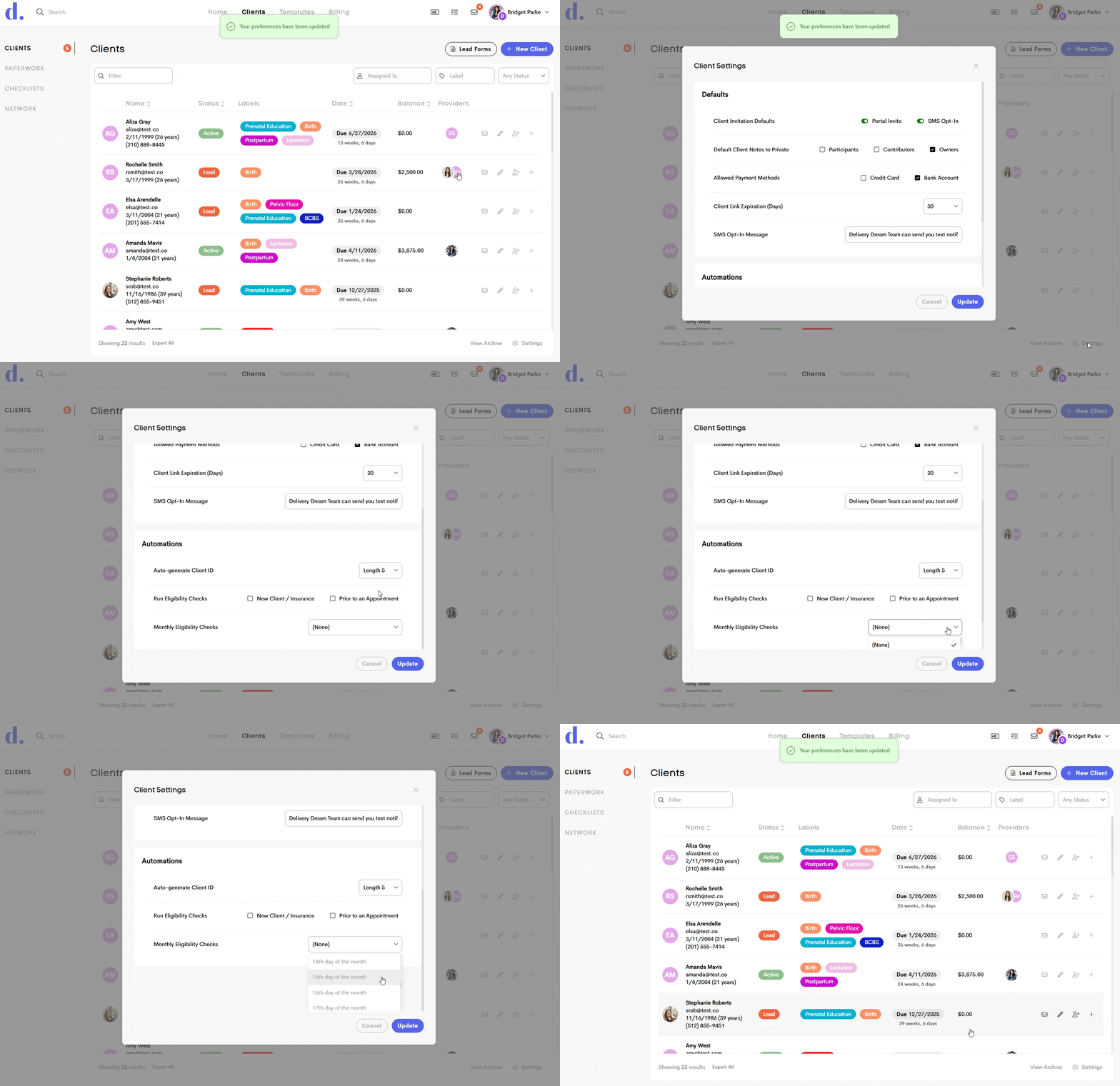
- Monthly eligibility checks: Previously, eligibility could only be checked automatically before a scheduled visit. Now, from your Client Settings, you can choose to verify insurance eligibility monthly on a specific day, even if a client doesn’t have upcoming appointments. You can run monthly eligibility checks for any active (non-deleted, non-archived) insurance records that are connected to a client journey for your business.
- Copying from archived claims: You can now copy information from archived claims as well. This update allows you to continue archiving claims as part of your workflow, while still being able to reuse claim details when needed, even after a claim has been archived.
#5 Other Enhancements
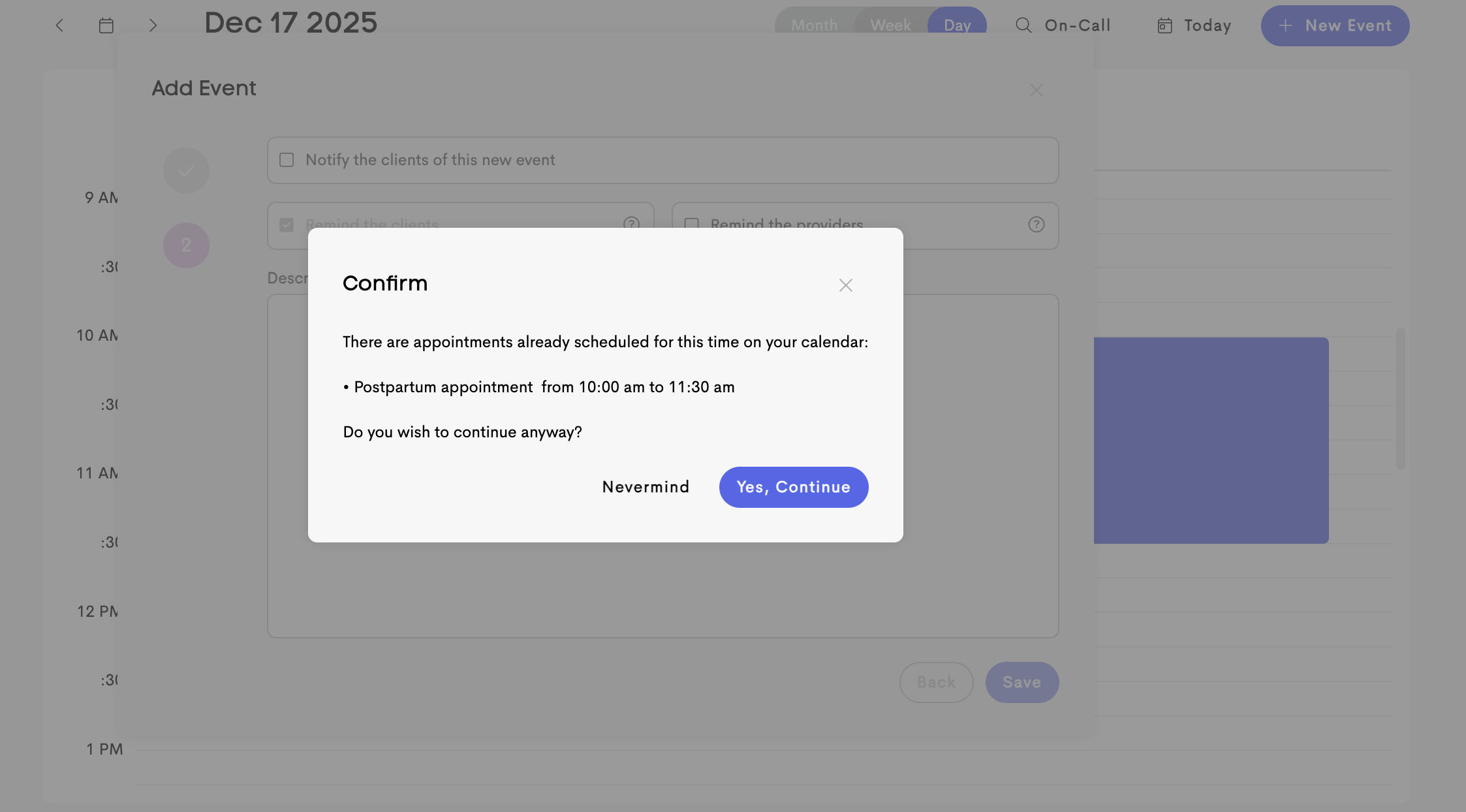
- Conflicting events notification: Scheduling just got easier! A new pop-up now alerts you when an event overlaps with something already on your calendar. You’ll see details about the existing event, so you can quickly decide whether to continue or go back and make changes. This helps prevent double-booking while keeping you in control of your schedule.
-
Edits to invoice surcharging: We’ve improved how invoice surcharges are calculated to automatically follow rules and regulations. Surcharging is now dynamically assessed based on more factors, including card type and card brand. Some credit cards have limits on the percentage that can be surcharged, while debit cards do not allow surcharges at all.
While debit card transactions may still incur a processing fee, since there is a cost to process all card payments, businesses are not permitted to pass that fee on as a surcharge. This restriction is set by major card network rules and federal regulations.
Our system now correctly identifies card types and, when surcharging is allowed, passes through the full processing fee of 3.2%, rather than the previous 3% limit—helping ensure compliance while more accurately reflecting processing costs.
The new message, while making a payment on a Doulado invoice, reads: Processing fees may apply; some cards may differ or be exempt:
- Credit Cards: 3.2% + 30¢ per transaction
- Bank Accounts:1.1% on the first $625.00, 0.3% after that
Exceptions to the standard processing fees include:
- Visa (limits surcharging of payment processing fees to 3% max)
- Debit cards (exempt from surcharging)
- Fonts displaying correctly: Previously, when you selected a font while editing or customizing a template, a generic font could appear instead of the one you had selected. The affected fonts have been fixed, and everything should now display correctly.
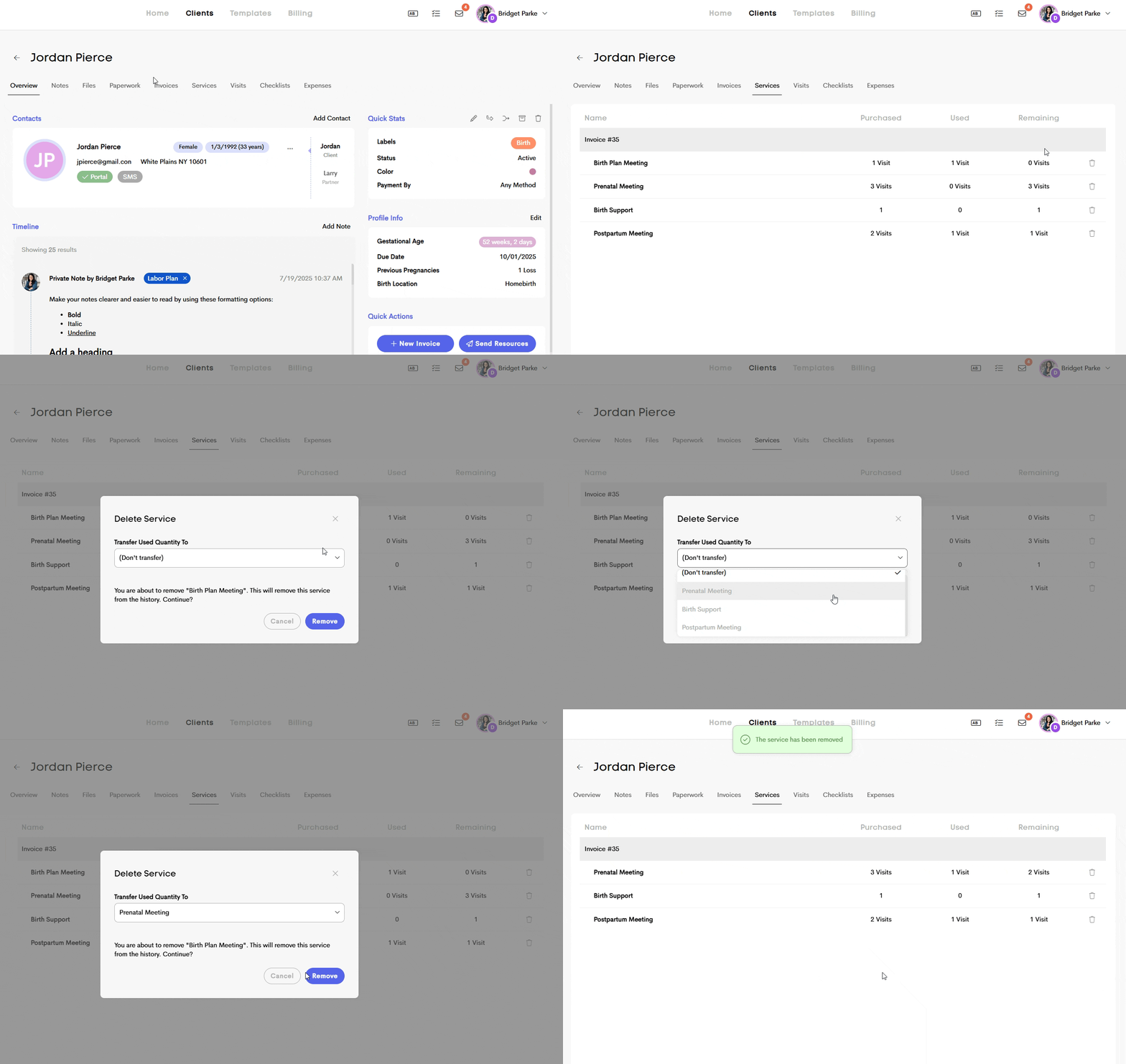
- Editable services: We know that service details don’t always stay the same. You may need to update a service on an invoice, switch packages, or remove a charged service that isn’t actually deliverable. You can now delete an individual service directly within a client journey. When deleting a service, you’ll have the option to transfer its units to another service line or remove them entirely, giving you more flexibility to keep records accurate and aligned with the care you provide.
As always, thanks for being a part of our Doulado community! We appreciate the continued support throughout 2025 and are excited to deliver more in 2026.